For Ubuntu 23.10, `gnome-extensions disable ding@rastersoft.com`
For Ubuntu 23.10, open a terminal and run `gnome-extensions disable ding@rastersoft.com`
For Ubuntu 23.10, open a terminal and run `gnome-extensions disable ding@rastersoft.com`
Please tell me more about your window environment; Gnome/Mutter don’t support Client Side Decoration (CSD) for Wayland clients, so wezterm draws its own limited decorations. Those don’t support right clicking or context menus, so I’m not sure how that maximize menu you described shows up.
Sure, though I don’t yet know anything beyond ”this is a standard Ubuntu 20.04 (Gnome) desktop, using Wayland”. Are there any commands I could run to find out more?
Copy & paste doesn’t work in the debug overlay (any selection I make is deselected as soon as I hit Ctrl), but there’s nothing there anyway apart from the intro (no matter how many times I trigger the resizing issue).

Linux Wayland
Gnome
20220927-071112-9be05951
Yes, and I updated the version box above to show the version of the nightly that I tried
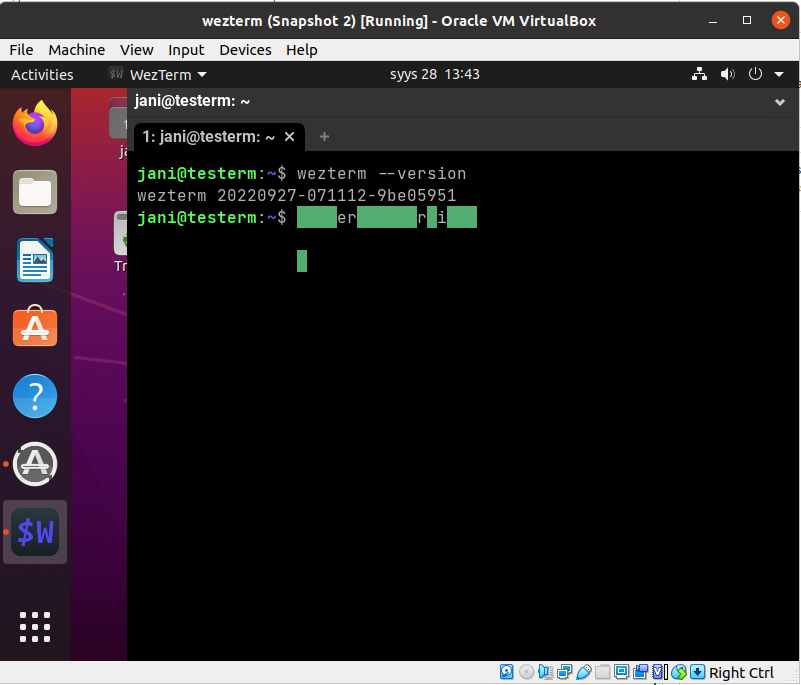
I’m running a standard Ubuntu 20.04 Gnome desktop, but with Wayland. Resizing of wezterm window is broken on this setup: selecting ”maximize” from the title bar context menu or dragging the window against the top or the sides of the screen doesn’t maximize/tile the window, but any resizing that does happen results in any text entered in the terminal thereafter to be get garbled. In this screenshot I’ve first entered wezterm --version before resizing, then dragged the window against the top, then entered wezterm --version again:
no config
After step 5, I expect the window to be maximized (i.e. to fill the desktop). After step 6, I expect to see what I typed.
no logs available
The issue is not present in an X11 session. Ubuntu 20.04 defaults to X11, but I’ve used it with Wayland exclusively since the release without issues. More specifically, I can’t remember seeing resizing issues similar to this with any other application.
I also have a laptop running Ubuntu 22.04 and Wayland, and there all resizing of the wezterm window works just as I’d expect (i.e. just as in any other application).
Trying to download this 7-hour long program only downloads (about) the first 6 hours and 40 minutes (~ 11 GB), after which the process just stops, and leaves Gnome terminal screwed up (typed characters are invisible until I run reset). In the web player the video seems to play past that point just fine.
This is on Ubuntu 20.04 with ffmpeg version N-58594-g715f63232f-static (static build from git master on 20210908).
jani@saegusa:Työpöytä$ /usr/local/bin/yle-dl 'https://areena.yle.fi/1-50934704'
yle-dl 20210808: Download media files from Yle Areena and Elävä Arkisto
Copyright (C) 2009-2021 Antti Ajanki <antti.ajanki@iki.fi>, license: GPLv3

Unsupported codec with id 98313 for input stream 2
Unsupported codec with id 98313 for input stream 5
Unsupported codec with id 98313 for input stream 8
Unsupported codec with id 98313 for input stream 11
Unsupported codec with id 98313 for input stream 14
Unsupported codec with id 98313 for input stream 17
Unsupported codec with id 98313 for input stream 20
Unsupported codec with id 98313 for input stream 23
Unsupported codec with id 98313 for input stream 26
Unsupported codec with id 98313 for input stream 29
Output file: YleX Esittää: Yle 95 - synttäribileet Linkkitornista: 2021-09-18T00:00.mkv
jani@saegusa:Työpöytä$  size=10814976kB time=06:39:40.68 bitrate=3694.5kbits/s speed=  44x
Note the prompt appearing on top of ffmpeg output on the last line. Typing echo $? reveals that the process exited with code 1.
Here’s the output when run with --verbose.
I’ve only tested this over the past couple of days so I don’t know if it’s a temporary error. Since the portion of the stream that I actually care about is all prior to the 6-hour mark, and the partial download is playable, I’m not too bothered to have the rest download. Reporting this just in case it’s a useful test of a corner case.
There’s no gnome-shell-extension-dashtodock package for focal [1], but I did try with Dash to Dock from extensions.gnome.org, and could not reproduce the issue with it. I tried with the default settings, as well as after recreating the look & feel of Ubuntu Dock as much as possible.
Dash to Dock has customizable action for the scroll (to either switch workspaces or windows, or to do nothing), and all of those also worked just as expected.
I also noticed that using the two finger scroll function of the touchpad on my laptop does *not* trigger this (whereas using the mouse on it does).
* [1] https://packages.ubuntu.com/search?keywords=gnome-shell-extension-dashtodock
Do you want another log for that? Because (as I already mentioned above), this also reproduces when using a newly-created user, so that means no unsupported extensions.
# Steps to reproduce
0. have a mouse with horizontal scrolling functionality (mine is a Microsoft Comfort Mouse 4500 with a tilting action for horizontal scroll)
1. move mouse pointer over the dock
2. use the mouse scroller to scroll horizontally
# What I expect to happen
Nothing
# What happens
Mouse pointer and everything on screen freezes. After a few seconds it unfreezes, but all the icons from the dock are missing. I have to log out and back in to restore the dock.
# Other info
Slightly similar to LP #1875106, but I’m not using imwheel.
I am using Wayland.
Syslog seems to always point to this one function: ”The offending callback was get_preferred_height(), a vfunc”. I’ll attach the relevant part from one crash.
I can confirm that 3.36.4-1ubuntu1~20.04.1 from -proposed fixed the issue (in Boxes) for me, i.e. the dialog text is now wrapped and hence entirely legible.
I think a warning is warranted: you may be tempted to do a dconf reset -f /, but besides clearing out schema-less keys, reset resets all affected values to their defaults. In any case, I recommend backing up your existing configuration (with dconf dump / >my-dconf.dump) before issuing a dconf reset.
I removed all but Desktop Icons, Ubuntu AppIndicators and Ubuntu Dock, rebooted and then reproduced the issue. Luckily I’ve found one way to reproduce this, albeit somewhat convoluted and still a bit unreliable, involving Synaptic and window tiling. And as it doesn’t seem to trigger the issue when using another account, I’m now working through settings differences between the two in hopes of finding something crucial.
While doing so, I did discover that dconf-editor is similarly affected:
    touko 12 16:09:32 saegusa gnome-shell[8208]: WL: compositor bug: The compositor tried to use an object from one client in a 'wl_pointer.enter' for a different client.
    touko 12 16:09:32 saegusa gnome-shell[8208]: WL: error in client communication (pid 12364)
    touko 12 16:09:32 saegusa dconf-editor[12364]: Error reading events from display: Katkennut putki
    touko 12 16:09:32 saegusa boinc[2098]: No protocol specified
    touko 12 16:09:32 saegusa boinc[2098]: No protocol specified
    touko 12 16:09:33 saegusa boinc[2098]: No protocol specified
    touko 12 16:09:33 saegusa boinc[2098]: No protocol specified
    touko 12 16:09:34 saegusa gnome-shell[8208]: WL: compositor bug: The compositor tried to use an object from one client in a 'wl_pointer.enter' for a different client.
    touko 12 16:09:34 saegusa boinc[2098]: No protocol specified
    touko 12 16:09:34 saegusa boinc[2098]: No protocol specified
    touko 12 16:09:34 saegusa gnome-shell[8208]: WL: error in client communication (pid 12796)
    touko 12 16:09:34 saegusa gnome-terminal-[12796]: Error reading events from display: Katkennut putki
    touko 12 16:09:34 saegusa systemd[3569]: gnome-terminal-server.service: Main process exited, code=exited, status=1/FAILURE
    touko 12 16:09:34 saegusa systemd[3569]: gnome-terminal-server.service: Failed with result 'exit-code'.
    touko 12 16:09:34 saegusa systemd[3569]: vte-spawn-da1941e8-60e5-48e5-868b-7348dd1158c7.scope: Succeeded.
    touko 12 16:09:34 saegusa gnome-shell[8208]: Error adding children to desktop: this.layout.get_child_at(...) is null
    touko 12 16:09:34 saegusa gnome-shell[8208]: Error adding children to desktop: this.layout.get_child_at(...) is null
    touko 12 16:09:34 saegusa gnome-shell[8208]: Error adding children to desktop: this.layout.get_child_at(...) is null
    touko 12 16:09:34 saegusa gnome-shell[8208]: Error adding children to desktop: this.layout.get_child_at(...) is null
Looks like dconf-editor did not exit with FAILURE, but the dconf-editor window did disappear just as Gnome terminal’s did.