Author: Jani

  • Firefox add-ons (extensions) for Google definitions and translation

    A lot of times you do things the hard way, and thankfully not know it. I use Google definitions a lot, and have always done so by using copy and paste, or even by typing the words in manually. It struck me just now that this procedure would be so much easier with a proper add-on for Firefox; what if I could, after having painted the text I would normally then copy and paste into Google, just point and right-click it, and have the definition pop up there for me?

    Doesn’t sound too complex, and sure enough, there already are extensions to do just that. The first one I tried was simply called Define. What it doesn’t do is give me the definition in the right-click menu, but instead gives me a shortcut item there for popping up the definition in a new tab.
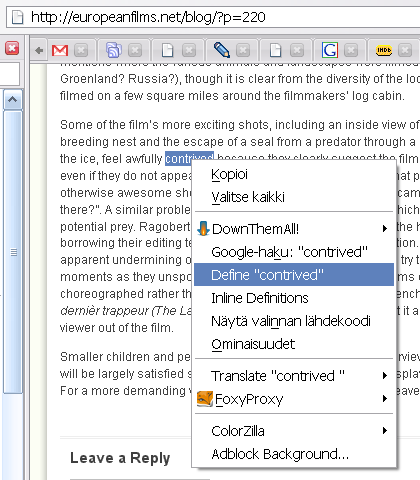
    Define Firefoxin kontekstivalikossa

    Now that is just fine, but even that seems a bit too complicated to me now that I’ve got it in my head that the definition could be given to me right there, in the context of the word itself.

    Enter Inline Google Definitions. With this little add-on, you get another item in the context menu (see the picture above), and by selecting it you get a nice little (JavaScript) pop-up window right by the highlighted term. After reading the definition you can close the pop-up or, if you wish, go see the actual Google definitions page the pop-up got its data from. Very nice!
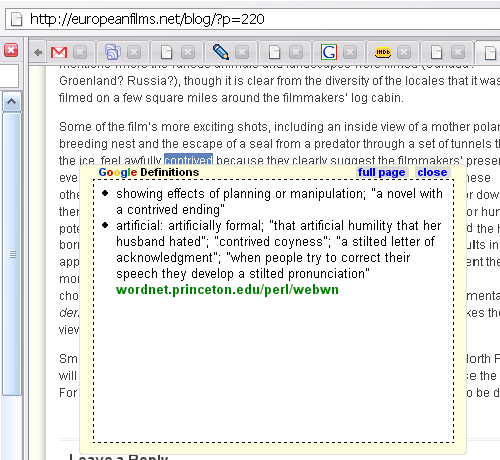
    Inline Google Definitions näyttää määritelmää

    When I began searching for the add-ons for Google definitions, I initially mistook gTranslate as one of them. It doesn’t do definitions, however, but instead translates (duh!) the highlighted text using one of selected dictionaries.
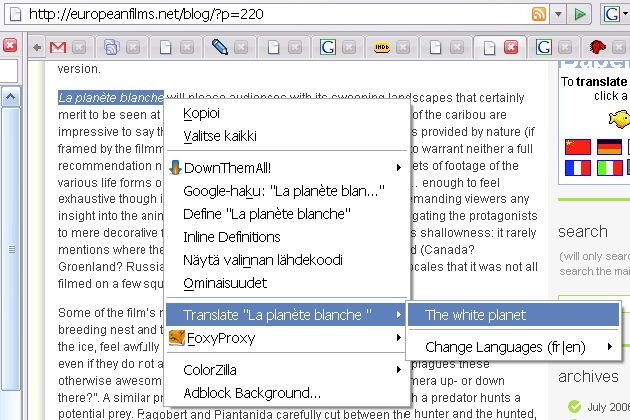
    Gtranslate Firefoxin kontekstivalikossa

    Although this wasn’t what I had in mind, I think gTranslate’s pretty useful too, so I’ve left it in my extensions for now. I do wish it did try the different dictionaries by itself until it would find a match, so that you wouldn’t have to choose the dictionary each time your source material uses a different language.

    Though, I don’t know if that would slow the right-click menu down too much and also, you might want to keep one selected language constant while using a single source, as the same word may be found in different languages. But a Select First Match option in the dictionaries list would solve this.

    (The page I was reading and used in the screenshots above was a review for La planète blanche (The White Planet) at europeanfilms.net.)

  • AVG upgraded from 7.1 to 7.5

    AVG, the excellent Anti-Virus software from Grisoft, has been upgraded from 7.1 to 7.5 (via Juha). Although this has happened already a month ago, for me, the auto-update feature hasn’t yet announced the availability of the new free version of 7.5. However, it is already downloadable from Grisoft’s site and can be installed on top of V7.1 by selecting Repair installation on the Select Setup Type screen. Note that a reboot is required after updating.

  • Microsoft, Novell Reach Accord on Linux

    “Microsoft Corp. reached a rapprochement with a major seller of the Linux operating system, a deal that makes a kind of peace between two opposing camps in the software industry. The deal with Novell Inc. is designed to make it easier for customers to use both Linux and Microsoft’s Windows software. […]

    The deal effectively makes Microsoft a reseller of Suse Linux, Novell’s version of the operating system, and kicks off a broad technology collaboration between the two companies. At the heart of the deal is a ‘patent covenant’ under which Microsoft agreed not to file patent-infringement charges against users of Suse Linux, and Novell agreed not to sue users of Windows.”

    WSJ via /.

    Ohjelmistojätti Microsoft ryhtyy tukemaan Windowsin ja Linuxin rinnakkaiskäyttöä. Yhtiö on allekirjoittanut sopimuksen Linuxia jakelevan Novellin kanssa. […] Yhtiöt ryhtyvät myös kehittämään yhdessä käyttöjärjestelmien rinnakkaiskäyttöä helpottavia ohjelmistoratkaisuja. Lisäksi Microsoft ei perää patenttioikeuksiaan sellaisten ohjelmistoratkaisujen osalta, joista tullaan mahdollisesti liittämään Suse Linuxiin.

    Yle24 via Juha

  • Timed Shutdown (for Windows)

    This program can be used to automatically shutdown, restart, log off, disconnect or hibernate your computer. There are four triggers that can be used: at a certain time, after a certain time, when the CPU usage goes down or when you get disconnected from the internet. This means that your computer doesn’t have to be on any longer [than] necessary.

    Tinnes.org.uk

  • Wikipedian Maria Guzenina -artikkelin vandalismista rikosilmoitus

    Maria Guzenina on tehnyt rikosilmoituksen (via Juha), koska katsoo joutuneensa nettihäiriköinnin kohteeksi Wikipediassa. Nettihäirikkö on Iltasanomien termi, eikä jutusta selviä tuon taivaallista siitä, mikä on epäillyn rikoksen nimeke tai juuri mitään muutakaan. Guzenina-artikkelin keskustelusivullakin halutaan lähinnä vain hillitä spekulointeja.

  • Customizing toolbars in IE7

    Via T. Schreiner: In order to bring the menu to the top, you need to adjust or set (if it isn’ there, which, by default, it isn’t) the following registry key to a DWORD value 1 (00000001): [HKEY_CURRENT_USER\Software\Microsoft\Internet Explorer\Toolbar\WebBrowser].

    Via enhanceIE.com (via jsalpha2): To make the search box disappear, you need to adjust or set [HKEY_CURRENT_USER\Software\Policies\Microsoft\Internet Explorer\InfoDelivery\Restrictions] to a DWORD value 1 (00000001). For my SP2 level XP installation, all the keys from Microsoft\ onwards had to be created (i.e. the rest of the path wasn’t there by default).

    As for the rest of it… well, apparently there’s just no way of removing or even moving the other buttons for favorites’ manipulation and so on. (Yes, I know that if you unlock the toolbar, you can push it to the side, but you can’t chop it off it’s position and move it to, say, the other side of the tab bar, let alone moving it vertically.)

    Wait a minute, you need to tweak the registry in order to customize IE7 toolbars to your liking, and even then you don’t get all that you want?!

    You’ve got to be kidding me.

    The GUI customization in IE7 is a joke compared to… well, I guess pretty much any other modern browser. Thank goodness there are better alternatives. (I’ll skip the cliché of linking to Firefox or Opera her… d’oh!)

  • Nordean korttien toiminnassa oli katko

    Nordean pankkikorttien toiminnassa oli runsaan tunnin katko aamupäivällä. Katko haittasi myös varmennuksia. Pankin mukaan kyse oli laiteviasta.

    YLE24

    Nordea huoltaa järjestelmiään tulevana lauantaina, jolloin katkoja on myös odotettavissa. Viimeksi maanantaina Sampo-pankin järjestelmässä oli vikaa.