Category: Uncategorized

  • Terratec Cinergy Digital 1200 DVB-C, Terratec Home Cinema ja Jyväskylän (Jyväsviestimen) kaapeliverkko

    Askartelin Terratec Home Cineman taajuustiedostosta version, jossa on Jyväsviestinnän (Elisan) digitaajuudet muxeineen: Terratec-Home-Cinema-Frequencies-Jkl.zip (14 kt). Alkuperäisen Frequencies.xml:n pitäisi löytyä kansiosta C:\Program Files\TerraTec\TerraTec Home Cinema\. Sammuta THC ensin, jos se on käynnissä ja nimeä alkuperäinen uudelleen (vaikkapa .old-päätteiseksi) ennen kuin kopioit paketista löytyvän Frequencies.xml:n kansioon, jotta katastrofin sattuessa alkuperäinen on tallessa.

    Tämän jälkeen THC:n asetusten skannausvälilehdellä pitäisi Alue-alasvetovalikossa olla valittavissa “Finland – Jkl”, jonka skannaamalla ainakin minä sain kaikki kanavat Radio Vegaa lukuunottamatta näkymään ja kuulumaan. Näin siis kirjoitushetkellä uusimmilla BDA-ajureilla ja THC:lla (BDA 4.8.11, THC 4.19).

    Alkuperäinen tiedosto on asennuksen jälkeen kirjoitussuojattu, siis “Vain luku” -tyyppiä. En tiedä, onko sillä merkitystä, mutta varmuuden vuoksi tein omastanikin sellaisen.
  • How to change an img element's alt text using JavaScript

    “setAttribute has two arguments: the attribute name and the attribute value. You can set any attribute of any element using the setAttribute method.”

    Mozilla

    alt is a property of the image element, so the JavaScript code for changing an img’s alt text becomes:

    myimg.setAttribute('alt', "New alt text");

  • Tourist Remover

    “Remove moving objects such as tourists or passing cars from your photos. Take multiple photos from the same scene and the «Tourist Remover» blends them into a composite photo without any interfering elements.”

    futureLAB via Baby Grandpa
    some links added

  • AMD vai Intel?

    “Muistiohjaimen sijoitus prossuun ei nähtävästi ole mikään ihme ratkaisu, jos uudet Intelin prossut ovat AMD:n niskan päällä jo nyt… ”

    FORWARD

    Kävin tänään kirjastossa lueskelemassa uusimman Linux Journalin (#148, August 2006). The Ultimate Future Linux Box -artikkelin mukaan muistiohjaimen sijoittaminen suorittimen sisälle on tulevaisuuden ratkaisu, ja samaa viestiä olin poimivinani myös surfaillessani äsken aihetta sivuavilla sivuilla; Intel tulee tekemään saman ennemmin tai myöhemmin.

    Tuossa LJ:n artikkelissa kuitenkin myös todettiin se, ettei AM2-kantaisiin suorittimiin sijoittaminen juuri nyt silti vielä välttämättä kannata, koska pullonkaulaksi muodostuu nykyisten DDR2-muistikampojen latenssi. Lisäksi, sitten kun riittävän nopeat muistikammat tulevat, ei nyt ostettu emolevy välttämättä tuekaan niitä. Tällä hetkellä integroidulla muistiohjaimella varustetuista AMD:n suorittimista ei saada irti enempää kuin Intelin perinteisessä, ulkoisessa ohjaimessa roikkuvista suorittimista.

    Oli miten oli, ensi vuoden loppuun mennessä AMD:n kaikki kuluttajaluokan prosessorit ovat kaksiytimisiä, eikä nähtävästi siinä vaiheessa AM2:ta vanhemmalla kannalla tee juuri mitään, hyvä jos silläkään.

    Vallitseva näkemys tuntuu olevan, että Intel on mennyt heittäen AMD:n edelle suoritinten tehoissa, eikä tilanne tule siitä myöskään muuttumaan vähään aikaan. Joutuukohan tässä vielä vaihtamaan suoritinvalmistajasuosikkia? Olen suosinut AMD:n suorittimia niiden edullisuuden ja hyvän hinta/teho-suhteen takia, mutta juuri nyt näyttää kyseenalaiselta auttaako AMD:tä edes hintojen puolittaminen.

    Intelin tämänhetkisissä suorittimissa ei kantojen kanssa tarvi arpoa.

    (Enin osa linkeistä Juhalta.)

    P.S.: Vain päivä tämän kirjoittamisen jälkeen Intel leikkasi hinnoistaan pois peräti 60 %.

  • The DivxTest project

    “What is the DivxTest project ?

    Have divx players tested by end-users, in order to get the most objective summary of (DVD)-divx players capabilities. Some comparisons already exist, but none has aimed to test as much players as possible (basically ALL of them) and none has been made by the end-users themselves.

    Our tests are easy : no personal feeling is requested and no particular technical knowledge. You will proceed with simple compatibility tests and with an inventory of the capabilities/connexion possibilities of your standalone divx player. The only thing which is required to access the “approved Tester” rank is a little bit of your time.”

    DivXtest.com via movie-player
    some links added

  • Disabling Playstation2's Parental Level Control

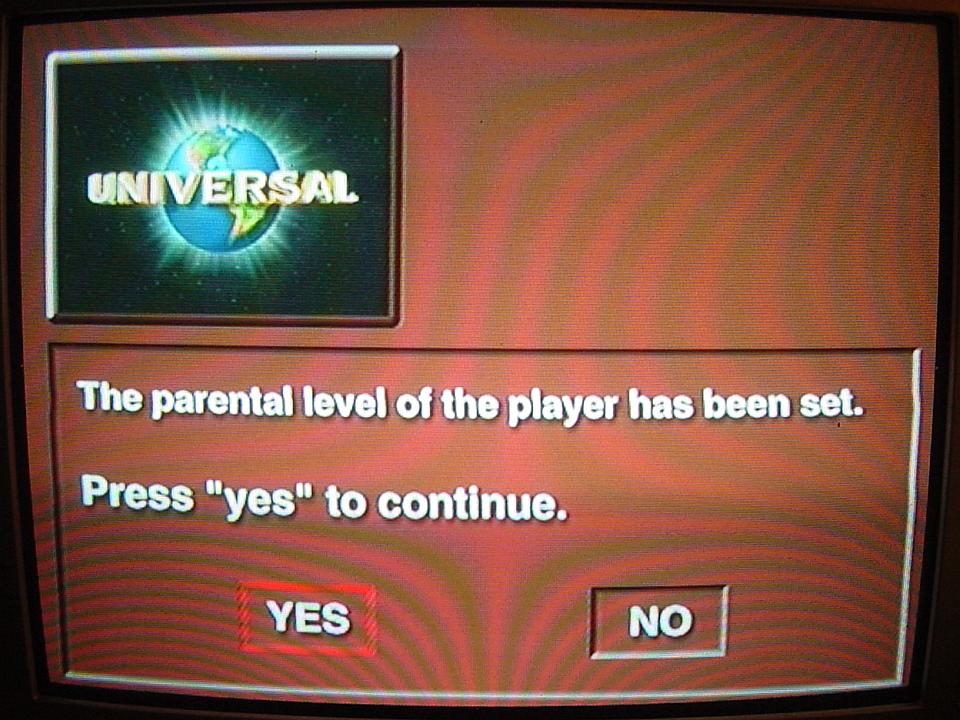
    Came across my PS2’s parental level setting for the first time last night. A quick googling revealed the odiously complicated procedure of disabling it, as aquired by whimzywim straight from the horse’s mouth, the Sony tech support. I tidied it up and wrapped it in to a list to make it a bit easier to follow.

    1. Turn off your PS2.
    2. Turn it on and insert the DVD.
    3. When you are notified of the parental controls being set, choose Yes.
    4. It then asks you for your password; hit select. It should now say delete password.
    5. Enter password 7444.
    6. You are asked to create a new password; make it 0000 (and re-enter it when it asks for confirmation). It then should say registration complete and will continue to DVD menu.
    7. Start playing the movie.
    8. Once the movie begins playing press select.
    9. You should now have a bunch of icons on the screen; click on the stop icon.
    10. Bring up the icons again by pressing Select.
    11. The stop icon should be grey even though you are highlighting it. If it is still blue, press it again.
    12. Once the stop button is grey, even though you are highlighting it, click on the icon underneath the 7 – the one that looks like a briefcase and is called Setup.
    13. Hit the right directional button until you are at the custom setup screen.
    14. Hit the down directional button until you are on the parental control setting.
    15. Hit the right directional button.
    16. It should ask for your password; enter 0000.
    17. Press the down directional button until you are at Level.
    18. Press the right directional button.
    19. Press up on the directional button until you reach the desired level; off is at the very top.
    20. Click X.
    21. Go back to the original icon list and press play.
    22. Play the movie to make sure it plays. Do NOT turn off the PS2.
    23. Once the movie is playing, press the eject button, remove the DVD and close the tray.
    24. Once the tray is closed, turn off the PS2 by using the switch on the back of the console.
    25. Wait at least 5 seconds.
    26. Turn your PS2 back on and insert the DVD.
    27. The settings should now be saved and you should be able to play DVDs without the annoying parental controls.