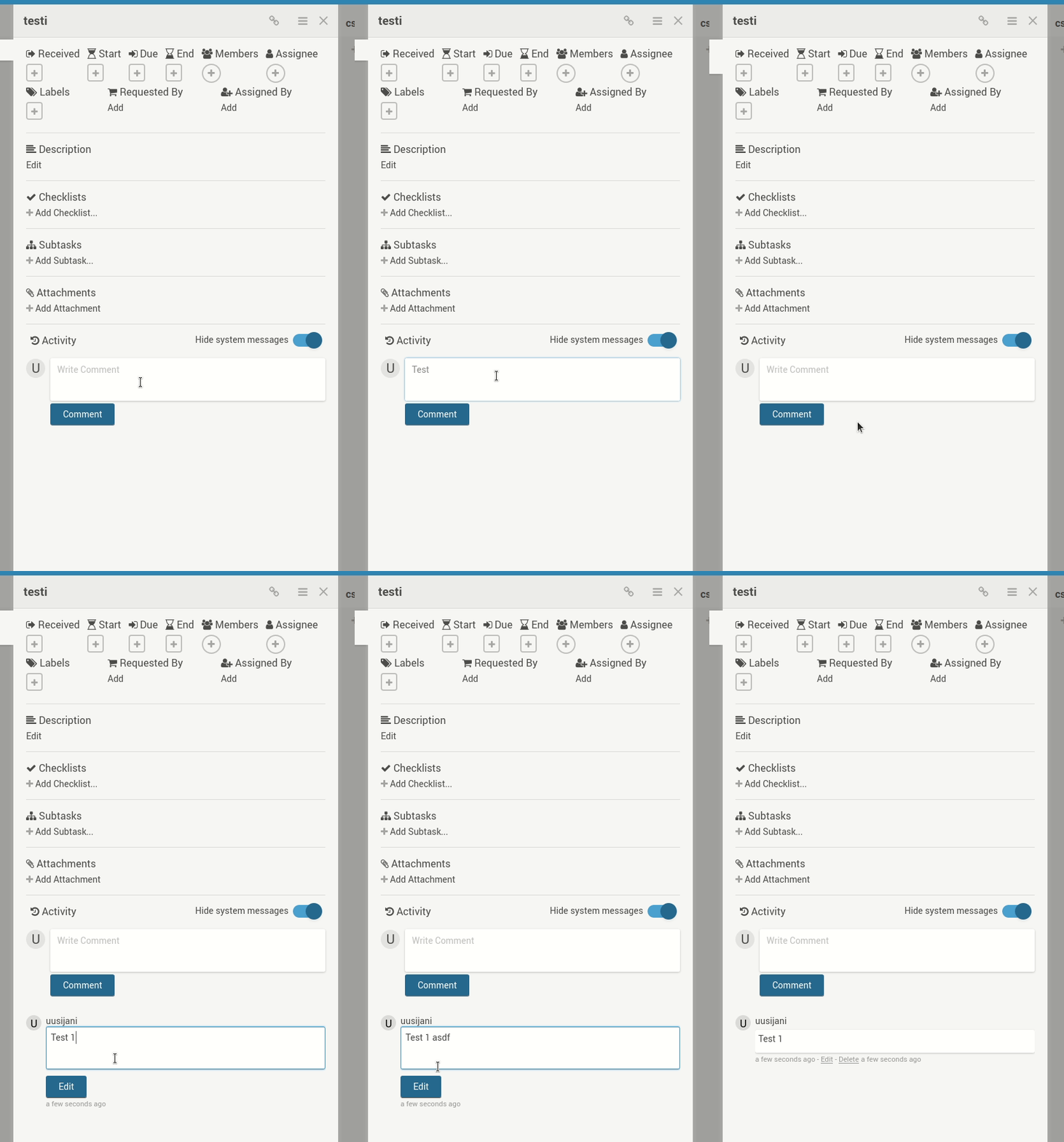
Comments can no longer be updated, as pressing the Edit button just reverts the comment back to what it was prior to editing. Both rich and non-rich editor are affected.
Server Setup Information:
- Wekan version: 3.89
- Operating System: Ubuntu 16.04
- Deployment Method: snap
- Http frontend if any: Apache
- Web browser: both Chrome and Firefox affected
Steps to reproduce
- Add a comment to a card.
- Click the
edit link to start editing the comment, make some changes.
- Click the
Edit button.
What I expect to happen
For the comment to reflect the changes made when editing.
What happens instead
The comment content reverts back to what it was prior to editing.
Logs
Nothing in browser console log, nothing related in server log.
For some of the depressing history of this, see bug #875002 (which has been incorrectly marked as fixed by someone without a clue) from way back in 2011.
I’m using 20.04 and a Wayland session. My preferred focus mode is to have it follow the mouse cursor:
$ gsettings get org.gnome.desktop.wm.preferences focus-mode
’mouse’
Unfortunately this causes GTK apps’ popup (RMB) menu to jump to the app window corner when opened. I’m attaching a screencast, where I demonstrate the bug first, then reset focus-mode to ’click’ to demonstrate the bug no longer manifesting. (Please excuse the flashing. It’s just a video artefact caused by Gnome’s built in screen recorder, which was the only one that at least somewhat worked.)
This has been reported upstream, where a fix was recently merged: https://gitlab.gnome.org/GNOME/mutter/issues/1103
Folders for auto upload? I have Camera twice (/storage/emulated/0/DCIM/Camera; once for pictures, the other for videos), OpenCamera (/storage/emulated/0/DCIM/OpenCamera) and Screenshots (/storage/emulated/0/DCIM/Screenshots).
(I only tried OpenCamera briefly, recently, and have since uninstalled it. The issue at hand was present already back when I first got this phone and installed Nextcloud on it, last July.)
I’ve always had auto upload enabled until now, so can’t say whether it’s dependent on that. I could try disabling it next time the issue re-emerges; as dictated by Murphy’s law, I was unable to trigger it just now that I intentionally tried to.
Oh, and I am running Beta (so currently 3.11.0 RC4) of the Nextcloud app. Can’t remember when I enrolled in.
I presume updating an existing installation is just a matter of replacing the existing files with files from the new release, but as this isn’t made explicit in the readme, I’m just a bit apprehensive about going ahead with it.
Problem description
Using ctrl-v to paste content into a comment causes the view to scroll back horizontally so that if the card was already at the right edge of the view, it seemingly pops out of view. This happens when using Firefox; Chrome seems unaffected.
I’m currently unable to test whether the non-rich editor is affected due to #2967, and also, as I was exclusively using non-rich editor prior to this, I can’t say if this occurred with the 3.85 refresh or whether it was here with the rich editor even before.
Server Setup Information
- Wekan version: 3.85
- Operating System: Ubuntu 16.04 (19.10 in another test VM)
- Deployment Method: snap
- What webbrowser version? Firefox 74.0, Chrome 80.0.3987.149
Logs contain nothing related to this AFAICT.
Steps to reproduce
- Copy something to clipboard
- Have a board with enough lists to fill the view horizontally, or contract the browser window to have one list at the right edge
- Open a card from the rightmost list
- Select the comment field, press ctrl-v
Demo
Here I’m first typing something, then pasting below it (using ctrl-v) to cause the unwanted scrolling to occur.

After today’s snap refresh to 3.85, rich editor is used for comments despite richer-card-comment-editor being set to false. Yesterday this was still working, and I didn’t change the settings, so it’s something to do with the latest refresh.
Server Setup Information:
- Wekan version: 3.85
- Operating System: Ubuntu 16.04 (19.10 in another test VM)
- Deployment Method: snap
- What webbrowser version? Firefox 74.0, Chrome 80.0.3987.149
Problem description:
(Nothing related in any logs)

Confirming as fixed! (Sorry for not getting back sooner, looks like Github failed to notify me.)
Here’s output from logcat:
03-19 16:33:47.099 20119 20119 E AndroidRuntime: FATAL EXCEPTION: main
03-19 16:33:47.099 20119 20119 E AndroidRuntime: Process: android.process.media, PID: 20119
03-19 16:33:47.099 20119 20119 E AndroidRuntime: java.lang.RuntimeException: Unable to start receiver com.android.providers.media.MediaScannerReceiver: java.lang.StringIndexOutOfBoundsException: length=1; index=-3
03-19 16:33:47.099 20119 20119 E AndroidRuntime:        at android.app.ActivityThread.handleReceiver(ActivityThread.java:3619)
03-19 16:33:47.099 20119 20119 E AndroidRuntime:        at android.app.ActivityThread.access$1300(ActivityThread.java:237)
03-19 16:33:47.099 20119 20119 E AndroidRuntime:        at android.app.ActivityThread$H.handleMessage(ActivityThread.java:1803)
03-19 16:33:47.099 20119 20119 E AndroidRuntime:        at android.os.Handler.dispatchMessage(Handler.java:106)
03-19 16:33:47.099 20119 20119 E AndroidRuntime:        at android.os.Looper.loop(Looper.java:214)
03-19 16:33:47.099 20119 20119 E AndroidRuntime:        at android.app.ActivityThread.main(ActivityThread.java:7078)
03-19 16:33:47.099 20119 20119 E AndroidRuntime:        at java.lang.reflect.Method.invoke(Native Method)
03-19 16:33:47.099 20119 20119 E AndroidRuntime:        at com.android.internal.os.RuntimeInit$MethodAndArgsCaller.run(RuntimeInit.java:494)
03-19 16:33:47.099 20119 20119 E AndroidRuntime:        at com.android.internal.os.ZygoteInit.main(ZygoteInit.java:964)
03-19 16:33:47.099 20119 20119 E AndroidRuntime: Caused by: java.lang.StringIndexOutOfBoundsException: length=1; index=-3
03-19 16:33:47.099 20119 20119 E AndroidRuntime:        at java.lang.String.substring(String.java:1995)
03-19 16:33:47.099 20119 20119 E AndroidRuntime:        at com.android.providers.media.utils.MPLogger.log(MPLogger.java:118)
03-19 16:33:47.099 20119 20119 E AndroidRuntime:        at com.android.providers.media.MediaProvider.call(MediaProvider.java:5073)
03-19 16:33:47.099 20119 20119 E AndroidRuntime:        at android.content.ContentProvider$Transport.call(ContentProvider.java:403)
03-19 16:33:47.099 20119 20119 E AndroidRuntime:        at android.content.ContentResolver.call(ContentResolver.java:1763)
03-19 16:33:47.099 20119 20119 E AndroidRuntime:        at com.android.providers.media.MediaScannerReceiver.logToDb(MediaScannerReceiver.java:139)
03-19 16:33:47.099 20119 20119 E AndroidRuntime:        at com.android.providers.media.MediaScannerReceiver.onReceive(MediaScannerReceiver.java:77)
03-19 16:33:47.099 20119 20119 E AndroidRuntime:        at android.app.ActivityThread.handleReceiver(ActivityThread.java:3610)
03-19 16:33:47.099 20119 20119 E AndroidRuntime:        ... 8 more
The upload process (I think) then dies:
03-19 16:33:47.164 2044 13653 I ActivityManager: Killing 20133:com.nextcloud.client/u0a0 (adj 100): depends on provider com.android.providers.media/.MediaProvider in dying proc android.process.media (adj 100)
I have the same issue on my Samsung Galaxy A9 phone, with ”android.process.media has stopped” appearing for virtually every photo taken (though the uploads seem to still go through). My Samsung Galaxy Tab S5e does not have the same issue, nor do I recall seeing this on any other Android devices (from other manufacturers).
I don’t use alarmapp (to my knowledge, though I’m not sure which app that is).
