Avainsanana Firefox

Rich editor in place despite richer-card-comment-editor = false

24. maaliskuuta 2020 klo 10.32
Sijainti: Vianhallintajärjestelmät: Github
Avainsanat: Chrome, Firefox, Wekan

After today’s snap refresh to 3.85, rich editor is used for comments despite richer-card-comment-editor being set to false. Yesterday this was still working, and I didn’t change the settings, so it’s something to do with the latest refresh.

Server Setup Information:

  • Wekan version: 3.85
  • Operating System: Ubuntu 16.04 (19.10 in another test VM)
  • Deployment Method: snap
  • What webbrowser version? Firefox 74.0, Chrome 80.0.3987.149

Problem description:
(Nothing related in any logs)

screenshot

Vastaa viestiin sen kontekstissa (Github)

Here are the banner settings

5. marraskuuta 2019 klo 13.08
Sijainti: Vianhallintajärjestelmät: Github
Avainsanat: Firefox, Mattermost

Hi @amyblais, thanks for taking a look!

Here are the banner settings:

# grep -i banner config.json 
        "EnablePreviewModeBanner": true,
        "EnableBanner": false,
        "BannerText": "",
        "BannerColor": "#f2a93b",
        "BannerTextColor": "#333333",
        "AllowBannerDismissal": true

I should also mention that I’ve previously enabled Developer Mode ("EnableDeveloper": true), but I’m not sure it’s related, since the notification in this issue has the normal blue background, not a purple one.

The issue reappeared today for the other affected user, then kept disappearing and reappearing under testing, but we were unable to pin down any specific reason. Their browser console (Firefox) only has this:

websocket connecting to wss://[redacted]/api/v4/websocket websocket_client.jsx:35:20

and the server log meanwhile only has this line repeated:

mlog/log.go:174	{"name":"TypeError","message":"NetworkError when attempting to fetch resource.","stack":""}	{"path": "/api/v4/logs", "request_id": "g8wwo8yu57djmkipjxjxn7hy3y", "ip_addr": "[redacted]", "user_id": "[redacted]", "method": "POST", "err_where": "client", "http_code": 0, "err_details": ""}

(where user_id is the one for the affected user.)

Vastaa viestiin sen kontekstissa (Github)

”A new version of Mattermost is available” notification remains after selecting to ”Refresh the app now”

4. marraskuuta 2019 klo 16.52
Sijainti: Vianhallintajärjestelmät: Github
Avainsanat: Chrome, Firefox, Mattermost

Summary

Selecting the ”Refresh the app now” link from update notification doesn’t make the notification go away.

Steps to reproduce

Have MM server updated to latest release. Open an existing session of the web app in Firefox. See the refresh prompt, select ”Refresh the app now”.

Expected behavior

Web page is refreshed, the notification goes away.

Observed behavior (that appears unintentional)

Web page is refreshed, but the update notification is still there, still prompting to refresh.

Verbose version

With some of the most recent updates (perhaps 5.16 and newer), the ”Refresh the app now” link in the update notification (”A new version of Mattermost is available”) on the web app did not make that notification go away for myself and another user. The link did cause a refresh of the page content, but the notification persisted. Meanwhile the version being reported by ”About Mattermost” was the correct (5.16.2).

Ctrl+shift+r or other hard refresh attempts did not have an effect, but logging out and then back in to the site finally did make the notification go away.

We’re both Firefox users, and due to the nature of the issue it was difficult to tell if this was browser-specific, but a fresh login using Chrome (while the previous session in Firefox still showed the notification) did not bring up the notification in the new session.

The issue, though irritatingly persistent while it lasted, was still relatively ephemeral, and now that it’s gone, I wouldn’t know how to reproduce it before the next server update. That said, I’ll happily provide more details if I can.

Vastaa viestiin sen kontekstissa (Github)

Checklist item gets overwritten by previous item when selecting another item with mouse

20. toukokuuta 2019 klo 17.28
Sijainti: Vianhallintajärjestelmät: Github
Avainsanat: Chrome, Firefox, Snap, Wekan

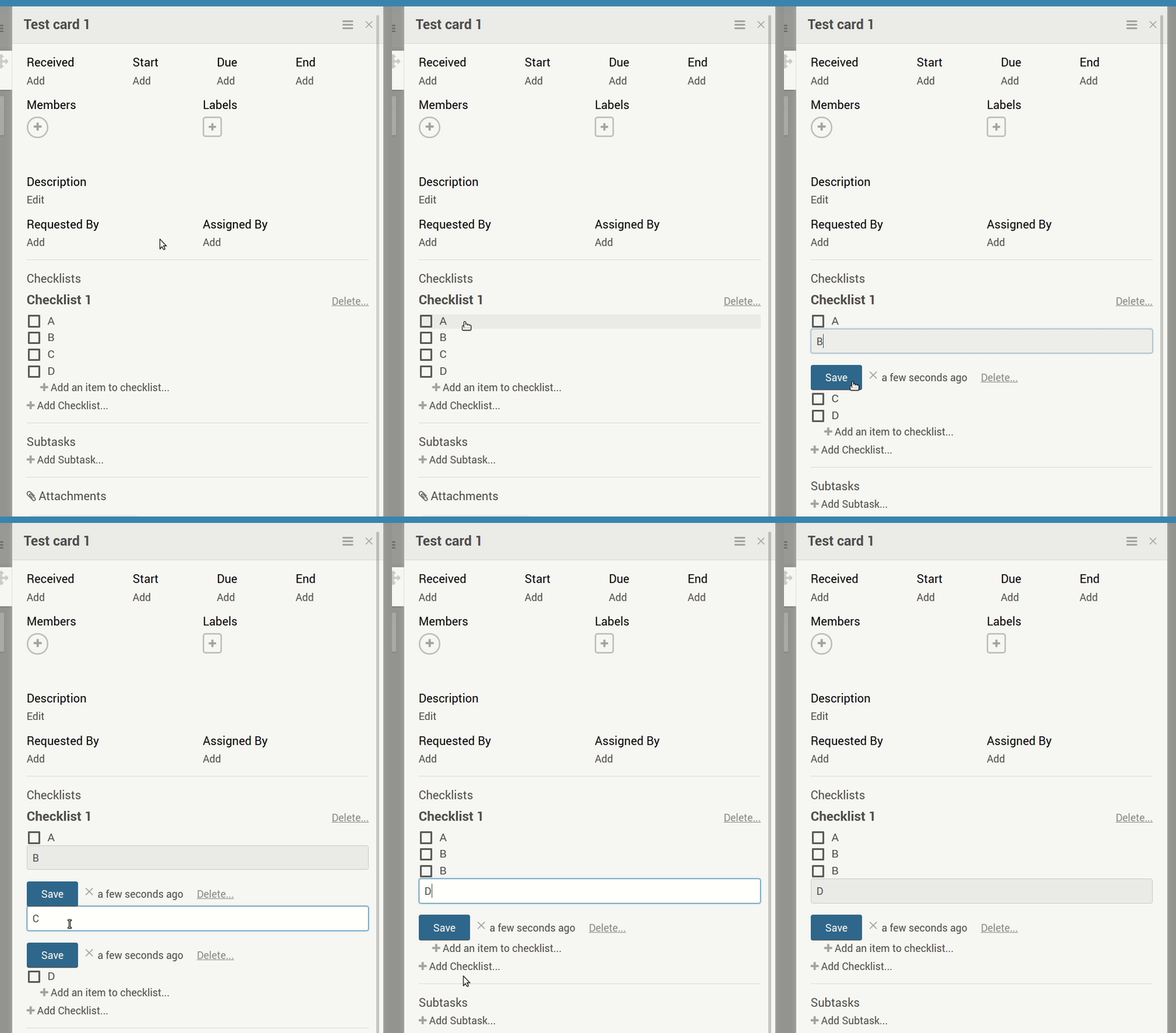
When a checklist item is in edit mode (through the specific steps below), selecting another item for editing does not take the previous item out of edit mode, and upon selecting a third item (or pressing enter) causes the second item to be overwritten by whatever content is in the first selected item.

Server Setup Information:

  • Wekan version: 2.74
  • Operating System: Ubuntu 16.04
  • Deployment Method: snap (stable)
  • Http frontend if any: Apache 2.4
  • ROOT_URL environment variable: https://my-domain.com/kan

Problem description:

Steps to reproduce

  1. Have a card with a checklist with 4 (or more) items with contents A, B, C, D (and so on):
  2. Select item A with LBM
  3. Select item B with LBM
  4. Select item C with LBM
  5. Select item D with LBM

What happens
At step 4, when C opens for editing, B remains in edit mode. At step 5, contents of C are overwritten by contents of B (that is, ”C” becomes a ”B”).

What I expect to happen
At step 4, for B to leave edit mode, and at step 5, the contents of C to remain as they are.

Other notes

  • Reproducible in both Chrome and Firefox.
  • Curiously, this does not seem to affect the firstly selected item: in step 3 above, A leaves edit mode correctly and thus B doesn’t get overwritten by the contents of item A in step 4.
  • At step 5, instead of selecting item D, pressing enter has the same effect.

Browser console output
empty

snap logs wekan.wekan
nothing related

Vastaa viestiin sen kontekstissa (Github)

Yep, retrying does work

19. maaliskuuta 2019 klo 19.54
Sijainti: Vianhallintajärjestelmät: Launchpad
Avainsanat: Firefox

Yep, retrying does work.

I’ve now reported this to Mozilla and linked to it. Thanks, Olivier!

Vastaa viestiin sen kontekstissa (Launchpad)

(My) original report on Launchpad

19. maaliskuuta 2019 klo 19.53
Sijainti: Vianhallintajärjestelmät: Mozilla Bugzilla
Avainsanat: Firefox, Tom's Hardware

(My) original report on Launchpad: https://bugs.launchpad.net/ubuntu/+source/firefox/+bug/1820514

Any page under https://forums.tomshardware.com/ seems to trigger this, but I have yet to come across other sites that do. Pages can even be saved from the main Tom’s Hardware domain (https://www.tomshardware.com/) without issues.

A workaround discovered by Olivier Tilloy: clicking retry in the download manager completes the save.

Vastaa viestiin sen kontekstissa (Mozilla Bugzilla)

Saving a web page from Tom’s Hardware forums fails

19. maaliskuuta 2019 klo 19.52
Sijainti: Vianhallintajärjestelmät: Mozilla Bugzilla
Avainsanat: Firefox, Tom's Hardware

Steps to reproduce:

  1. Open https://forums.tomshardware.com/threads/what-is-the-actually-difference-between-udimm-and-dimm.1575984/
  2. Right-click and select ’Save page as’. Point the dialog to your directory of choice.

Actual results:

There’s no copy of the page in the target directory. Going to about:downloads reveals that the download has failed, without further details.

Expected results:

For the directory to contain a downloaded copy of the page.

Vastaa viestiin sen kontekstissa (Mozilla Bugzilla)

Tested all combinations of both, all with the same results

18. maaliskuuta 2019 klo 20.05
Sijainti: Vianhallintajärjestelmät: Launchpad
Avainsanat: Firefox

Tested all combinations of both (Ctrl-s/context menu in safe mode and normal mode), all with the same results. Could this be locale-dependent? The UI is in English in safe mode though, so I’m guessing safe mode should be locale-independent, as I’m on fi_FI.UTF-8 otherwise.

And just to clarify: my testing of Bionic was on real hardware as well, and I ran these latest tests on Cosmic on another computer (real hardware).

Vastaa viestiin sen kontekstissa (Launchpad)

Saving a web page from Tom’s Hardware forums fails

17. maaliskuuta 2019 klo 15.42
Sijainti: Vianhallintajärjestelmät: Launchpad
Avainsanat: Firefox, Tom's Hardware

== Steps to reproduce ==
1. Open https://forums.tomshardware.com/threads/what-is-the-actually-difference-between-udimm-and-dimm.1575984/
2. Right-click and select ’Save page as’. Point the dialog to your directory of choice.

== What I expect to happen ==
For the directory to contain a downloaded copy of the page.

== What happens ==
There’s no copy of the page in the target directory. Going to about:downloads reveals that the download has failed, without further details.

== Other info ==
I’m reporting this from up-to-date Disco, albeit with a 4.* kernel (as gdm currently fails to start in my VirtualBox VM with 5.*) but it’s equally reproducible in Bionic.

Any page under https://forums.tomshardware.com/ seems to trigger this, but I have yet to come across other sites that do. Pages can even be saved from the main Tom’s Hardware domain (https://www.tomshardware.com/) without issues.

Vastaa viestiin sen kontekstissa (Launchpad)

Page content slightly transparent, reveals content from another window below

16. joulukuuta 2018 klo 15.37
Sijainti: Vianhallintajärjestelmät: Launchpad
Avainsanat: Firefox, Intel, VirtualBox, YouTube

Under some circumstances, content from one Firefox window hidden behind another leaks onto the top one. Reproducible in both Bionic (with Intel graphics) and Disco (in a VirtualBox VM), reporting this from Disco.

== Steps to reproduce ==
1. Open one Firefox window, drag it to the right side of screen to fill the right half, and navigate to https://www.twitch.tv/rifftrax
2. Open another Firefox window, maximize it on top of the first one, and use this topmost window to open https://www.youtube.com/watch?v=P5dxd-ocaE8 and expand the Youtube view to ’theatre’ mode

== What happens ==
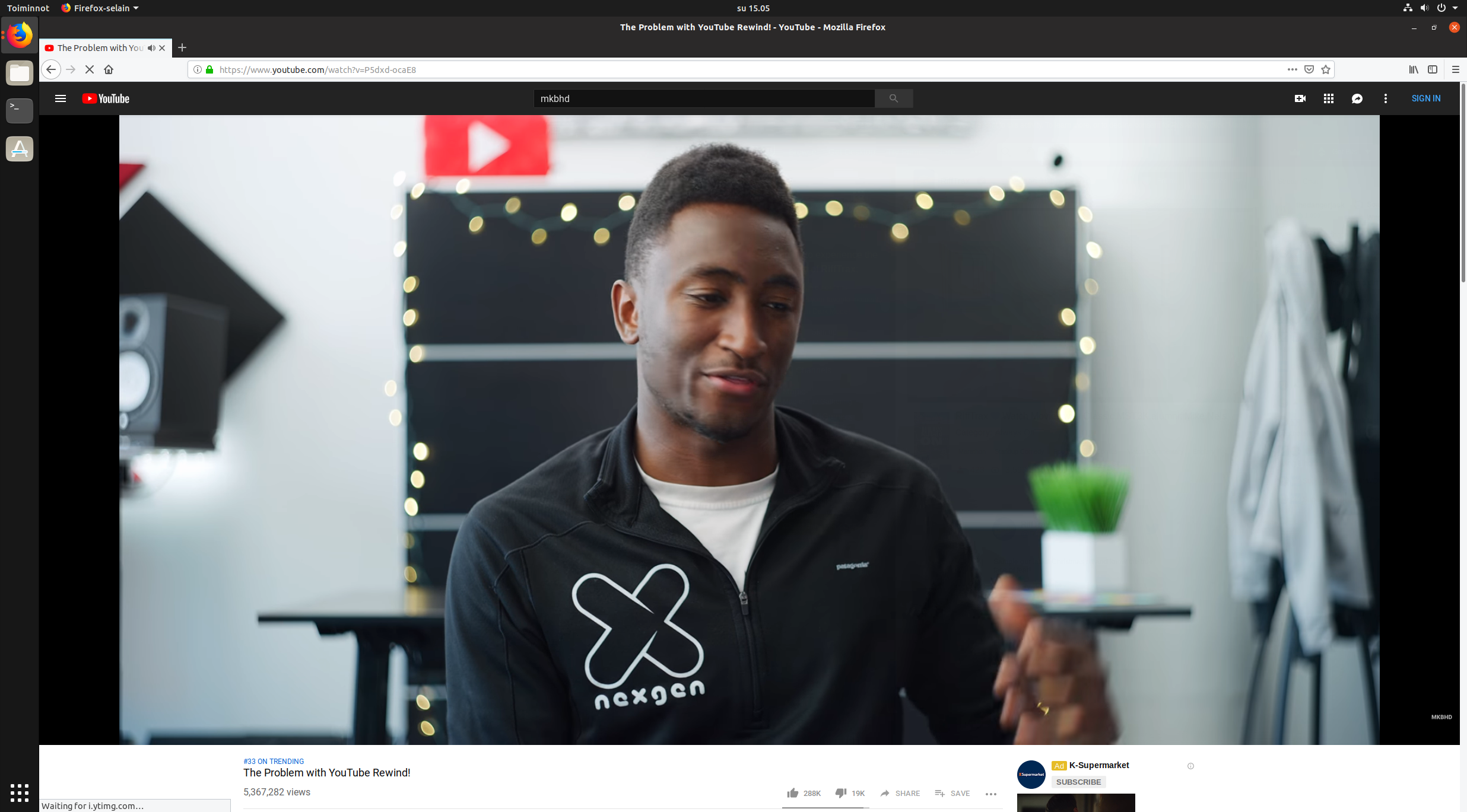
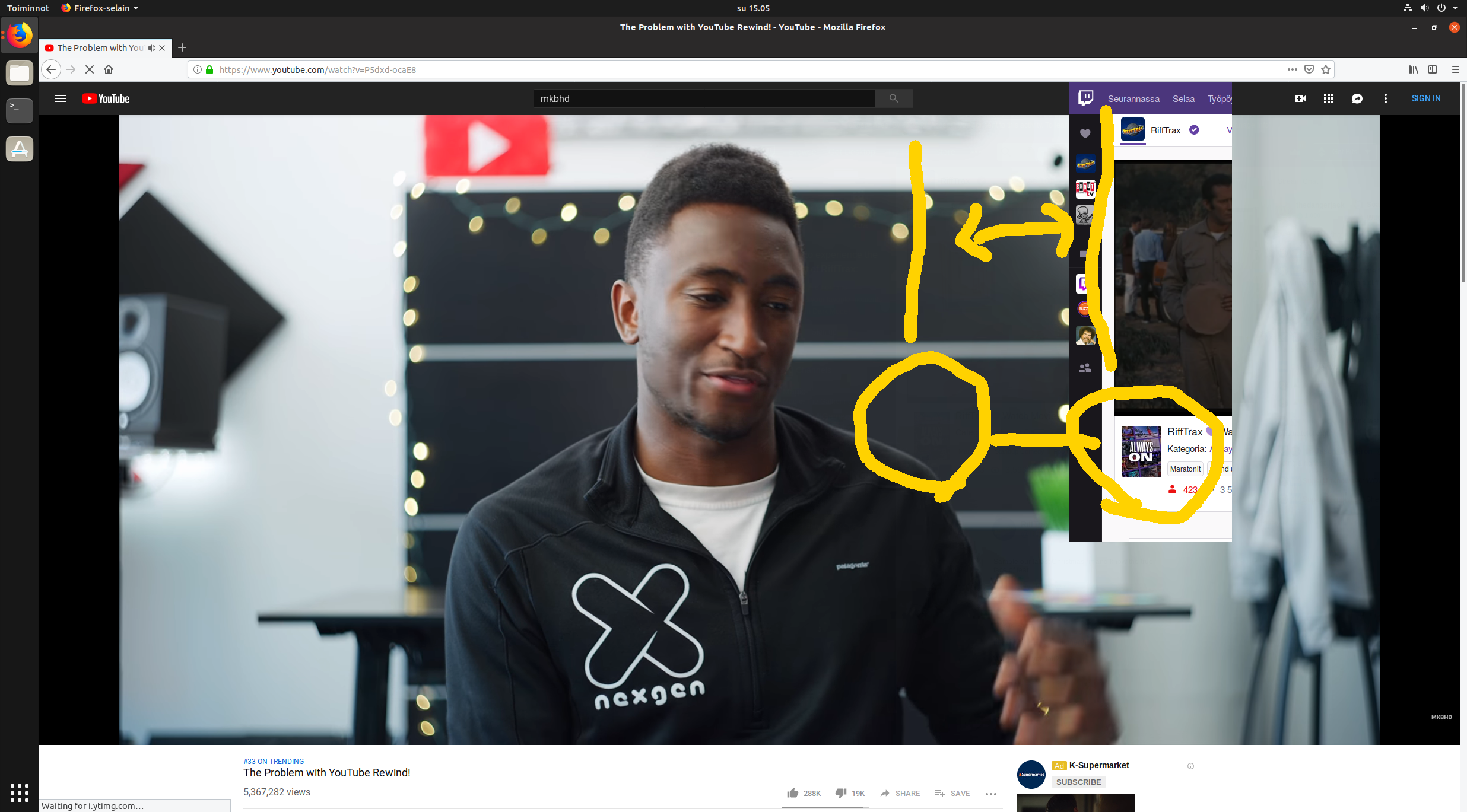
White parts of content in Firefox window #1 cast a spectral shadow on the black parts of content in Firefox window #2. It’s quite subtle, but luckily can be caught in screenshots: see attachments below. Pausing the Youtube video seems to make the effect to go away (the transparency disappears).

== What I’d expect to happen ==
For the topmost window to be completely opaque, i.e. not to see anything from behind the topmost window whether the video is playing or not.

== Other info ==
Though I don’t think this is tied the two sites I’ve used as an example, they’re the first and only ones I’ve happened to encounter this with. I’ve yet to find other reports about this, apart from one /r/Fedora thread mentioning something similar: https://www.reddit.com/r/Fedora/comments/7m9m4h/youtube_videos_are_transparent_kind_of_in_firefox/

Untouched screenshot of top window revealing content from another window below

Same screenshot with added hints about see-through content

Vastaa viestiin sen kontekstissa (Launchpad)

« Uudempia - Vanhempia »