Okay, this was a conflict between the new integration and the third party integration I had been using up until now. I did uninstall the old integration before trying to setup the new one, but apparently that wasn’t enough; I also had to manually purge all references to sleep_as_android (both old and new) from .storage/core.entity_registry. Only after that (and core restart) the setup showed the webhook URL as expected.
The problem
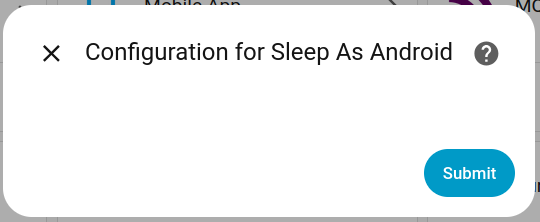
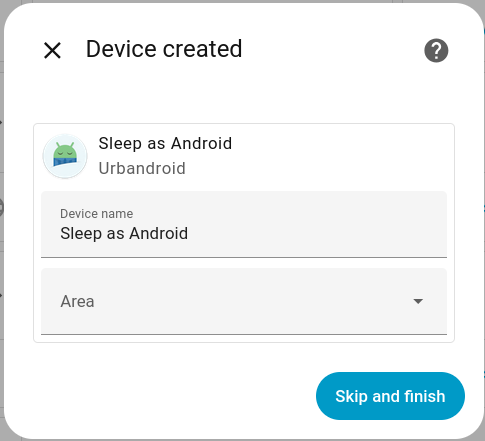
The setup instructions say ”You will be presented a URL during the setup process.” I see no URL during the setup process (nor is it available anywhere after setup).
Steps to reproduce:
Select Settings > Devices & services > Add integration > Sleep as Android
What I expect to happen:
To ”be presented a URL during the setup process.”
What actually happens:
What version of Home Assistant Core has the issue?
core-2025.9.1
What was the last working version of Home Assistant Core?
No response
What type of installation are you running?
Home Assistant OS
Integration causing the issue
Sleep as Android
Link to integration documentation on our website
https://www.home-assistant.io/integrations/sleep_as_android/
Diagnostics information
config_entry-sleep_as_android-01K5BG3KZKPF229RQSVK9BYAYC.json
Example YAML snippet
Anything in the logs that might be useful for us?
I’ve tried enabling debug logging for the integration, but it produces no output at all.
Additional information
No response
Switched to 11.1 and tried updating those components again. No change unfortunately.
home-assistant_2024-11-14T09-59-20.244Z.log
After last night’s refresh I’m now running 2024.10.4. Attempting to update Nordpool, fmi-hass-custom and pytapo fail with:
Unable to install package nordpool==0.4.2: error: failed to create file `/snap/home-assistant-snap/637/.lock` Caused by: Permission denied (os error 13)
Unable to install package fmi-weather-client==0.4.0: error: failed to create file `/snap/home-assistant-snap/637/.lock` Caused by: Permission denied (os error 13)
Unable to install package pytapo==3.3.32: error: failed to create file `/snap/home-assistant-snap/637/.lock` Caused by: Permission denied (os error 13)
It’s apparently due some changes in core, as some people running HA inside a customized Docker have also suffered this.
In the previous latest/stable, updating Nordpool and FMI weather client failed with errors about pip’s version, so I had reverted those back to their earlier versions and put off retrying the updates until now. Pytapo could be a dependency of Tapo Camera Control, which also updated recently.
A tooltip is used to render explanations for terminology when site content is viewed directly in a browser. But feed readers traditionally don’t support styles, and so the content is broken up by the <span class='terminology-tooltip'> elements’ content being shown mid-sentence. For instance, this paragraph in the 2024.10 release post
<p>We also introduce some small YAML automation syntax changes. If you are still a sucker for writing your automations
in <span class='terminology'>YAML<span class='terminology-tooltip'>YAML is a human-readable data serialization
language. It is used to store and transmit data in a structured format. In Home Assistant, YAML is used for configuration,
for example in the <code>configuration.yaml</code> or <code>automations.yaml</code>
files.<a class='terminology-link' href='/docs/configuration/yaml/'> [Learn more]</a></span></span> (like me), I’m sure
you’ll love these little tweaks that make it all feel more natural.</p>
is shown in my feed reader (Tiny Tiny RSS) as:

I’m not sure if this is a recent technical change, or just the first instance of these spans being used, or if I just haven’t been reading the posts that thoroughly, but the 2024.10 release post was the first I noticed this.
I’m on amd64 too, and yep, it’s working just fine after switching to 2024.7/candidate. Excellent, thank you!
Yeah, still not working for me either. Restarting HA snap just results in the same traceback getting logged as before.
Settings > Devices & services > HACS shows it’s up to date (or at least at that same version, 1.34.0). I can’t find a ”Configuration” or ”HACS update” view under the HACS service, only the one with related Service info, Automations and so on (possibly because HACS is ”Not loaded”, which is the issue).
I don’t know if the host system has any bearing on this, but mine is running Ubuntu 20.04, and I’ll happily provide any other info if needed.


Here’s the full traceback I have, unfiltered. It refers to pydantic, and it looks like something people have worked around by forcing pydantic to version 1.10.16. I barely speak any Python at all though, so I wouldn’t know what other implications this has, if any, but I hope it’s at least a clue.
ha.log
I think my HA is also affected by this. I haven’t done any firewall snooping and I’m not using pFsense, but I also have a timer based on Kodi’s ”turn_off” event, and the symptom of repeated ”turn_off” events match. The workaround from @ChopperRob above also seems to work.
(Probably unrelated, but I’ve also noticed that my ”turn display on when Kodi becomes idle” stops working when my LAN/WLAN gets very congested (such as when doing backups over the network). I’m using ”idle” because the log never shows a ”turn_on” event from Kodi; just ”idle”, ”playing” and the intermittently incessant ”turn_off” events.)