Cool, I’m not going crazy! I’ve had a very, very similar issue for a couple of weeks now. Identical in fact, except for the triggers and frequency: three incidents so far, since the first one on January 11th, with the last two within two days earlier this week. In all instances I’ve had Twitch playing video in Librewolf, when suddenly the desktop freezes, leaving only a 500 ms bit of the audio looping endlessly. I had forgotten about magic SysRq, so I have yet to try if it works; I’ve also just done a hard reset instead.
If the logs posted by anonymousdormouse are related to the issue, then that’s one difference wrt. what’s happening here: there’s been nothing related to the problem in any logs. The system seems to just die instantly and completely.
Ubuntu is on an NVMe drive instead of a HDD, and it’s the only OS on the drive.
I have done one pass of memtest to rule out memory errors.
My system doesn’t have Nvidia, it’s using the integrated GPU of a Core i7-8700 with two external displays (one DP-connected, one HDMI-). (This is a Dell XPS desktop that originally came with an external Nvidia GPU, but I ripped it right out before installing the system. I’ve had enough bad experiences with Nvidia to know to avoid them whenever possible.)
Cool, thanks for the quick fix!
I’ve been using a custom template, which I’ve hooked in via the vlp_get_template filter in my theme, to format previews in the blog’s RSS feed to my liking.
With 2.2.8 this seems to be outright prevented:
“Fix: Only output link in RSS feed”
Indeed, there’s now a branching upon is_feed() in VLP_Link::output() before VLP_Template_Manager::get_template() is called, so my filter is never applied.
Would it be possible to have a filter for the feed case too? I see there’s been someone with a problem with their RSS feeds, but having just the link in the feed is a bit too simplistic for my use.
Is it safe to update mongod* packages outside the script (directly with apt)? I prefer to leave security updates (and only those) to unattended upgrades, but it doesn’t cover these since they’re from the mongodb repository. AFAICT, the script would only allow me to update all packages (with ”Update the Operating System”), but I don’t want non-security updates.
mongod-amd64/noble 8.0.8 amd64 [upgradable from: 8.0.4]
mongodb-database-tools/noble/mongodb-org/8.0 100.12.0 amd64 [upgradable from: 100.10.0]
mongodb-mongosh-shared-openssl3/noble/mongodb-org/8.0 2.5.0 amd64 [upgradable from: 2.4.2]
mongodb-org-database-tools-extra/noble/mongodb-org/8.0 8.0.8 amd64 [upgradable from: 8.0.5]
mongodb-org-shell/noble/mongodb-org/8.0 8.0.8 amd64 [upgradable from: 8.0.5]
mongodb-org-tools/noble/mongodb-org/8.0 8.0.8 amd64 [upgradable from: 8.0.5]
For anyone else stumbling across this thread when googling for this annoying problem: the issue here is that using special characters in your password on the DataSource line is broken: Can’t use special character in password in the DataSource property · Issue #1541 · mattermost/mattermost · GitHub
As stupid as that is, the easiest way to work around it is to set a password consisting of just alphanumeric characters. You shouldn’t have much use for it outside this anyway, so as not to make it ridiculously insecure.
A ”Mark read” choice in push notifications about new messages, as seen in many IM apps, would be handy in Mattermost Mobile too. Currently the message can only be marked read by tapping the message to open the app (which is slow).
Platform: Website
Browser: any, try wget
URLs: https://inaturalist.org/observations.atom?place_id=7020&taxon_id=40151&without_place_id=13005&without_taxon_id=46146,42184,42223,43095&verifiable=true
Description of problem:
I’m trying to exclude certain taxa from feeds that I’m subscribed to. This mostly works, but I keep getting species from (under) one excluded taxon in my feed.
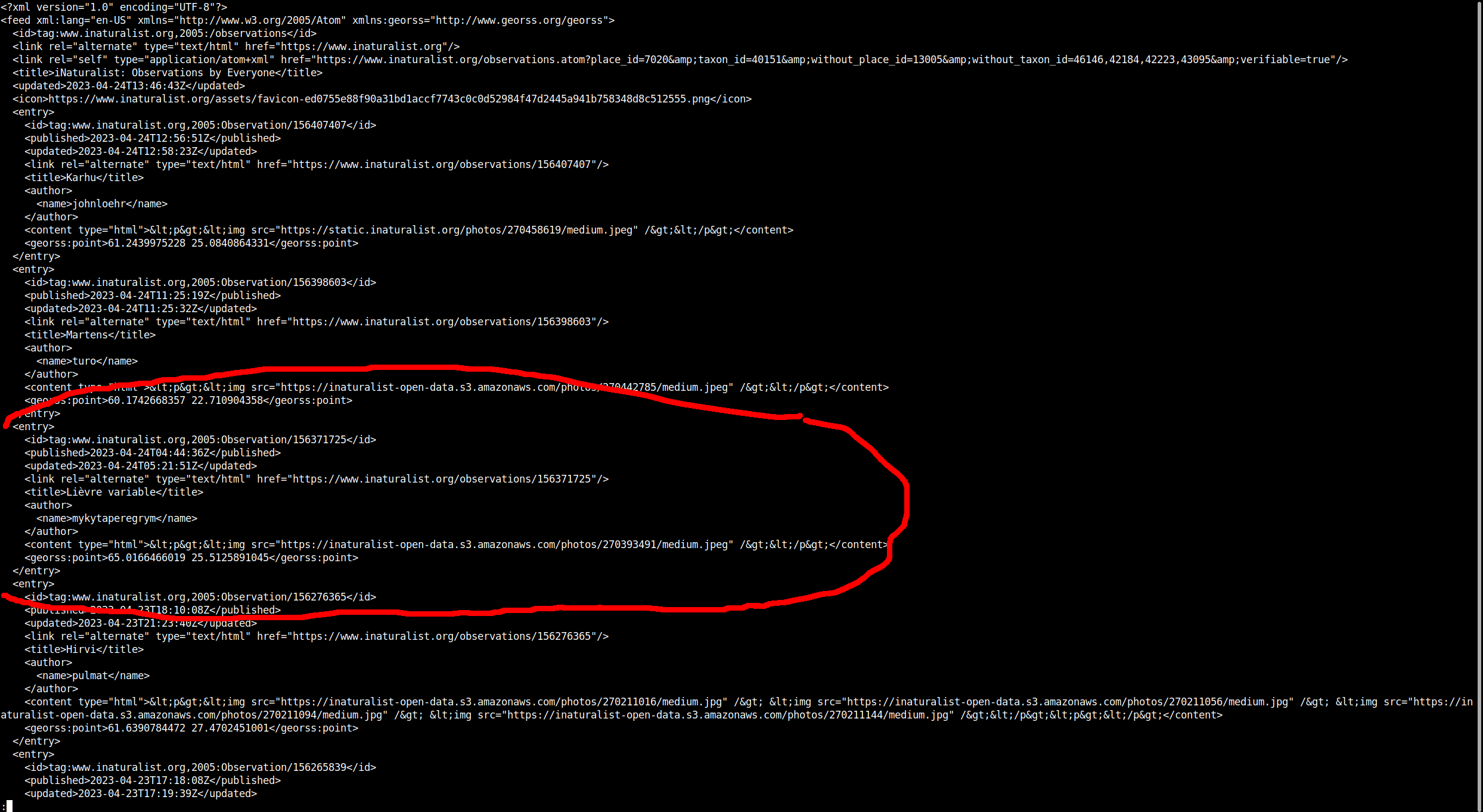
This is the feed in question. Among the excluded taxa is 43095 (Leporidae, or hares and rabbits), but as I’m writing this, the feed has observations of Lepus timidus and Lepus europaeus (the forum software is limiting me to 4 links, but my example of the latter is observation #156252007).
Corresponding HTML view of the same query does exclude these observations, as I would expect the feed to do.
Screenshots:
(Language for the entry title seems to be randomly selected for each observation, but that’s another issue.)
Elikkä siinäkin yksi hyvä kandidaatti poissuljettavaksi. Voi tietysti silti olla vain sattumaakin, kun nuohan ovat aika edullisia ja siksi varmaan aika yleisiä, kuvittelisin.
Omassani oli takuu vielä voimassa, joten sain toisen samanlaisen tilalle, eikä sen kanssa memtest-virheitä enää ilmennyt.
Kokemukseni mukaan memtest on aika luotettava sikäli, että jos se näyttää virheitä, niin vikaa on. Vian aiheuttaja sen sijaan ei aina ole se ilmeisin, eli ei välttämättä johdu fyysisistä muistikammoista itsestään, mutta (noin vanhassa laitteessa) niiden irrottelu on usein nopein testattava.
Yleisesti ottaen edetään poissulkumenetelmällä:
- Varmista, että memtest-ISO sekä kortti, jolta sen käynnistät, ovat molemmat ehjiä (eli ei luku-/kirjoitusvirheitä).
- Irrota kaikki laitteet, joita ilman kone vielä käynnistyy.
- aja memtest
- Jos memtest menee läpi (mieluiten 2-3 kierrosta) ongelmitta, lisää yksi laite, ja palaa kohtaan 3, kunnes ongelmalaite löytyy.
Tuo USB-kortinlukija voi sekin olla ongelma. Eli jos virheitä ilmenee vielä minimikokoonpanollakin, pitää kokeilla memtestiä myös joltain muulta laitteelta käynnistettynä (esim. USB-tikku).
Sattumalta itselläni viimeksi ongelmien syyksi paljastui juurikin upouusi (Kingstonin) SSD: ilman sitä memtest pyöri ongelmitta, SSD kytkettynä sen sijaan erroria pukkasi.
Hi @agriesser! Yeah, matthaios-easy-bi (who I assume is the OP in this thread too) had reported this on Github and it got fixed after I chimed in. I can confirm that the fix works too, i.e. after cherry-picking the change to my branch the build works again.
Thanks!