@Julian: I’d argue that if a simple accidental click somewhere can cause this, that’s a loaded gun pointed at the user’s toe, and hence a bug in the installer.
@Brian: I’ll try the 22.04 images. I’ve kept trying with 20.04.5, but have yet to find another instance of this occurring, so it’s obviously not easy to trigger.
I’m not particularly troubled by this issue (and the original reporter doesn’t seem to be either), so feel free to adjust ’Importance’ accordingly.
Please tell me more about your window environment; Gnome/Mutter don’t support Client Side Decoration (CSD) for Wayland clients, so wezterm draws its own limited decorations. Those don’t support right clicking or context menus, so I’m not sure how that maximize menu you described shows up.
Sure, though I don’t yet know anything beyond ”this is a standard Ubuntu 20.04 (Gnome) desktop, using Wayland”. Are there any commands I could run to find out more?
Copy & paste doesn’t work in the debug overlay (any selection I make is deselected as soon as I hit Ctrl), but there’s nothing there anyway apart from the intro (no matter how many times I trigger the resizing issue).
What Operating System(s) are you seeing this problem on?
Linux Wayland
Which Wayland compositor or X11 Window manager(s) are you using?
Gnome
WezTerm version
20220927-071112-9be05951
Did you try the latest nightly build to see if the issue is better (or worse!) than your current version?
Yes, and I updated the version box above to show the version of the nightly that I tried
Describe the bug
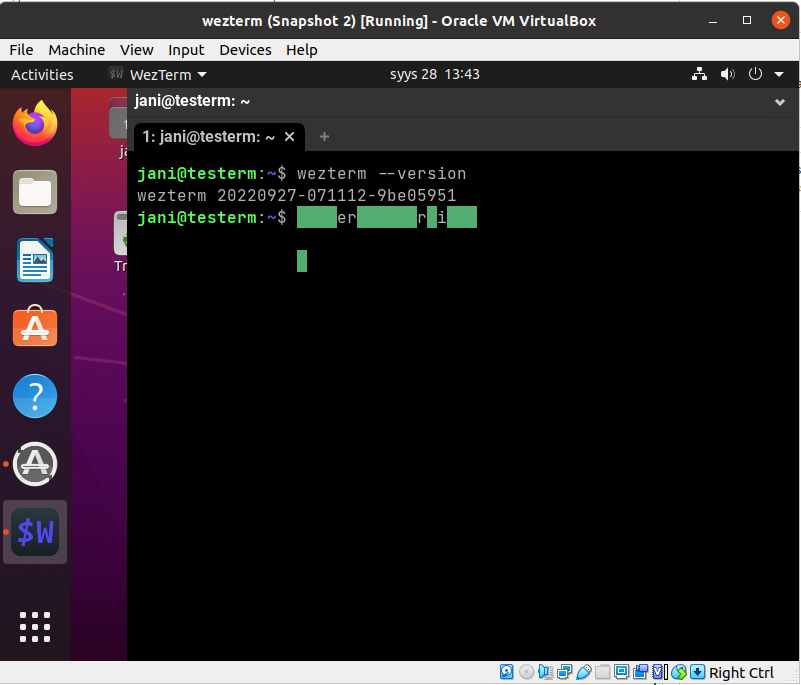
I’m running a standard Ubuntu 20.04 Gnome desktop, but with Wayland. Resizing of wezterm window is broken on this setup: selecting ”maximize” from the title bar context menu or dragging the window against the top or the sides of the screen doesn’t maximize/tile the window, but any resizing that does happen results in any text entered in the terminal thereafter to be get garbled. In this screenshot I’ve first entered wezterm --version before resizing, then dragged the window against the top, then entered wezterm --version again:
To Reproduce
Install your bog-standard Ubuntu 20.04 desktop in a VM and boot it up.
On the GDM login screen select ”Ubuntu on Wayland” from the bottom right menu, then log in.
Install wezterm.
Start wezterm.
Right-click wezterm’s title bar and select ”Maximize”.
Type something
Configuration
no config
Expected Behavior
After step 5, I expect the window to be maximized (i.e. to fill the desktop). After step 6, I expect to see what I typed.
Logs
no logs available
Anything else?
The issue is not present in an X11 session. Ubuntu 20.04 defaults to X11, but I’ve used it with Wayland exclusively since the release without issues. More specifically, I can’t remember seeing resizing issues similar to this with any other application.
I also have a laptop running Ubuntu 22.04 and Wayland, and there all resizing of the wezterm window works just as I’d expect (i.e. just as in any other application).
@Simon Here goes, although now it just shows both at 9.7, and 9.9 not yet available. Before I downgraded libc6 it obviously showed libc6 at 9.9.
I also tried to reproduce the issue in a fresh VM, but those kept getting 9.9 for all the packages, so installing build-essential caused no issues.
I don’t have in-depth knowledge about phased updates, but this looked like as if downloading the updates during installation was not yet affected by phased updates (and hence got libc 9.9), but, after the installation was completed, the system got cast into a ”still at 9.7” group of phased updates, and so libc6-dev (et al) could not be installed.
Just got hit by the same issue in a VM after a fresh install of 20.04.5. I chose ”Minimal installation”, ticked ”Download updates while installing”, and installed the remaining updates post-install.
After that the first thing I tried to do was to install build-essential, which failed, because the version of libc6 was out of sync with the rest of the libc6* packages: libc6 was already at 2.31-0ubuntu9.9, while e.g. libc6-dev was still only available as 2.31-0ubuntu9.7.
I tried switching from my local archive (fi.archive.ubuntu.com) to the main one (archive.ubuntu.com), but that made no difference. I had to downgrade libc6 to 2.31-0ubuntu9.7 to be able to install build-essential.
Using a path with umlauts as logDir causes an incorrectly encoded directory to be created and used as log directory, instead of the specified directory.
Steps to reproduce
Quit the client.
Edit nextcloud.cfg. Set logDir=/home/jani/Tänne (applying appropriately to your home directory)
Start the client.
ls /home/jani/Tänne
Expected behavior
A listing of new log files residing in /home/jani/Tänne.
Which files are affected by this bug
This question is unclear. The log files are the ones affected.
Operating system
Linux
Which version of the operating system you are running.
Ubuntu 20.04
Package
Distro package manager
Nextcloud Server version
24.0.4
Nextcloud Desktop Client version
3.5.4-20220806.084713.fea986309-1.0~focal1
Is this bug present after an update or on a fresh install?
Updated from a minor version (ex. 3.4.2 to 3.4.4)
Are you using the Nextcloud Server Encryption module?
Encryption is Disabled
Are you using an external user-backend?
Default internal user-backend
LDAP/ Active Directory
SSO – SAML
Other
Nextcloud Server logs
No response
Additional info
This bizarre and otherwise exhaustingly long issue form is lacking a ”What happens instead of my expected outcome” question, so I’m entering it here instead: there are no logs in the specified target directory (it doesn’t even exist if you’ve not created it beforehand). Instead, like in the ye olden days, there is now a directory called Tänne containing the logs. In nextcloud.cfg the path has been re-encoded as logDir=/home/jani/T\xc3\xa4nne/ which is apparently how it should be, since a similarly re-encoded value for a ...localPath with umlauts in the [accounts] section has been working just fine for as long as I can remember using it.