I removed all but Desktop Icons, Ubuntu AppIndicators and Ubuntu Dock, rebooted and then reproduced the issue. Luckily I’ve found one way to reproduce this, albeit somewhat convoluted and still a bit unreliable, involving Synaptic and window tiling. And as it doesn’t seem to trigger the issue when using another account, I’m now working through settings differences between the two in hopes of finding something crucial.
While doing so, I did discover that dconf-editor is similarly affected:
    touko 12 16:09:32 saegusa gnome-shell[8208]: WL: compositor bug: The compositor tried to use an object from one client in a 'wl_pointer.enter' for a different client.
    touko 12 16:09:32 saegusa gnome-shell[8208]: WL: error in client communication (pid 12364)
    touko 12 16:09:32 saegusa dconf-editor[12364]: Error reading events from display: Katkennut putki
    touko 12 16:09:32 saegusa boinc[2098]: No protocol specified
    touko 12 16:09:32 saegusa boinc[2098]: No protocol specified
    touko 12 16:09:33 saegusa boinc[2098]: No protocol specified
    touko 12 16:09:33 saegusa boinc[2098]: No protocol specified
    touko 12 16:09:34 saegusa gnome-shell[8208]: WL: compositor bug: The compositor tried to use an object from one client in a 'wl_pointer.enter' for a different client.
    touko 12 16:09:34 saegusa boinc[2098]: No protocol specified
    touko 12 16:09:34 saegusa boinc[2098]: No protocol specified
    touko 12 16:09:34 saegusa gnome-shell[8208]: WL: error in client communication (pid 12796)
    touko 12 16:09:34 saegusa gnome-terminal-[12796]: Error reading events from display: Katkennut putki
    touko 12 16:09:34 saegusa systemd[3569]: gnome-terminal-server.service: Main process exited, code=exited, status=1/FAILURE
    touko 12 16:09:34 saegusa systemd[3569]: gnome-terminal-server.service: Failed with result 'exit-code'.
    touko 12 16:09:34 saegusa systemd[3569]: vte-spawn-da1941e8-60e5-48e5-868b-7348dd1158c7.scope: Succeeded.
    touko 12 16:09:34 saegusa gnome-shell[8208]: Error adding children to desktop: this.layout.get_child_at(...) is null
    touko 12 16:09:34 saegusa gnome-shell[8208]: Error adding children to desktop: this.layout.get_child_at(...) is null
    touko 12 16:09:34 saegusa gnome-shell[8208]: Error adding children to desktop: this.layout.get_child_at(...) is null
    touko 12 16:09:34 saegusa gnome-shell[8208]: Error adding children to desktop: this.layout.get_child_at(...) is null
Looks like dconf-editor did not exit with FAILURE, but the dconf-editor window did disappear just as Gnome terminal’s did.
For future reference, this was probably Ubuntu bug #1875558 (”libproxy1-plugin-gsettings triggers a lot of warnings”).
Affected version
I’m using Ubuntu 20.04 and Wayland, with gnome-shell currently at version 3.36.1-4ubuntu1. (I originally filed this on Launchpad.)
Bug summary
When trying to start a virtual machine with Gnome Boxes, I get a prompt about keyboard shortcuts. The prompt text is localized, but translated back to English it says:
Boxes wants to inhibit shortcuts

You can restore shortcuts by pressing Super+Escape.
In my locale (Finnish), it says
Sovellus Boksit haluaa rajoittaa pikanäppäinten toimintaa.

Voit palauttaa pikanäppäinten toiminnan painamalla Super...
(sic; see attached photo)
So the actual key combination is truncated, defeating the point of that part of the text.
This isn’t a localization error (AFAICT, based on the translation source). Rather, it’s caused by the text being forced to fit on a single line of an arbitrarily fixed width, instead of wrapping to span as many lines as needed.
Screenshot
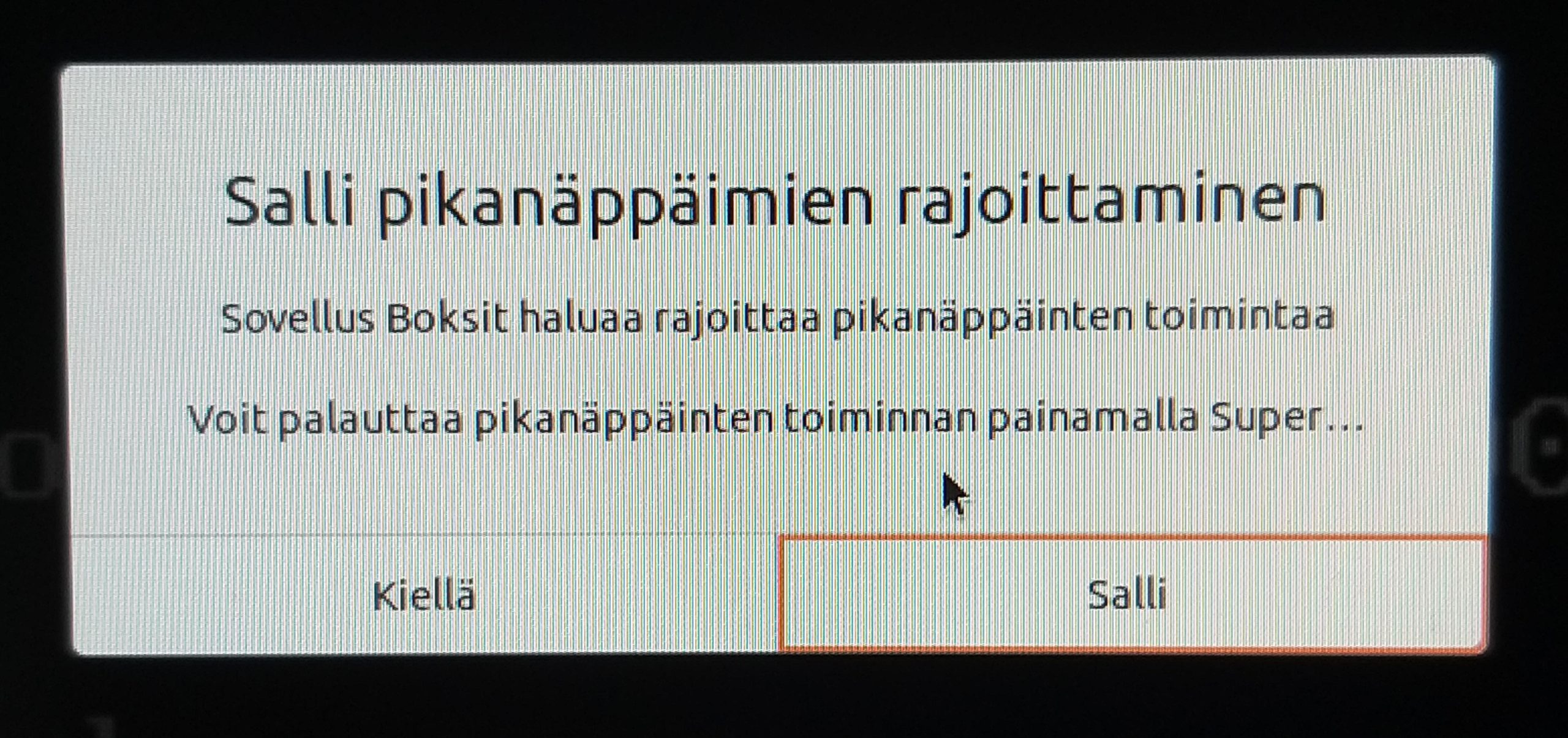
For some of the depressing history of this, see bug #875002 (which has been incorrectly marked as fixed by someone without a clue) from way back in 2011.
I’m testing Gonimo in anticipation of real-word deployment, and so far everything else seems to work as expected, but for some reason I can’t get the ”connection lost” alert to go away once it starts, even after the connection is re-established (as indicated by the video stream resuming). The red overlay (with ”connection lost!”) keeps flashing over the video stream, and the alarm sound keeps ringing no matter what I do in-tab. The only workaround I’ve come up with is refreshing the tab (F5).
In case this is environment-related, my laptop has Ubuntu 20.04 with Chrome 80.0.3987.116, my Android phone has Chrome 80.0.3987.119, and I’ve tested both ways (both as either the baby or the parent). I haven’t tested the Android app yet to see if it’s any different.
I’m using Ubuntu 18.04, which has Gnome Shell 3.28 (3.28.3+git20190124-0ubuntu18.04.1).
After I updated the extension to latest release (16), it fails to start. Gnome Shell reports this error:
Extension "System_Monitor@bghome.gmail.com" had error: TypeError: GObject.registerClass() used with invalid base class (is PanelMenuButton)
Downgrading to release 14 makes it work again.
Ubuntu’s appindicator extension has a similar issue from a while back, with pointers to an issue with the extensions website, but I’m unsure if this is related.
In any case, I decided to open this issue to at least document it. Feel free to close it if it’s intentional (Gnome Shell 3.28 no longer supported), or otherwise not a bug with System Monitor.
Tested this again and it seems to have been fixed at some point by some Ubuntu (18.04) updates: my test user still had version 8 of the extension, and I could no longer reproduce the issue, neither before nor after updating the extension to release v9. My main user’s desktop now also appears unaffected.
(I was going to try the workaround reported by @ChrisLancs, but ended up not having to. My ”List type” is set to ”Disabled”.)
Alternatively, after adding the PPA, replace ’cosmic’ with ’bionic’ in the sources list, as the package for Bionic currently appears to install and work in Cosmic just fine (from my brief testing).
So I did a little more digging, and found that this actually first cropped up in Ubuntu 17.10.
I then ran mozregression (back on 18.04, my main desktop) and here’s what it found:
7:12.48 INFO: Last good revision: 64bab5cbb9b63808d04babfbcfba3175fd99f69d (2017-10-25)
7:12.48 INFO: First bad revision: aa958b29c149a67fce772f8473e9586e71fbdb46 (2017-10-26)
7:12.48 INFO: Pushlog:
https://hg.mozilla.org/mozilla-central/pushloghtml?fromchange=64bab5cbb9b63808d04babfbcfba3175fd99f69d&tochange=aa958b29c149a67fce772f8473e9586e71fbdb46
After that ”There are no build artifacts on inbound for these changesets (they are probably too old).”
As this was my first time ever using mozregression, I have no idea how useful that was, but if there’s some way I can narrow this down further, I’d be happy to.

Still present in 20.04 (Focal) with vlc 3.0.9.2-1, though here at least it seems to only affect some URLs, not all. When I view a stream from my local webcam, vlc -vvv in the terminal shows
main playlist debug: incoming request – stopping current input
as the final message, and does not exit (after closing the window; Ctrl-Q still works). But when streaming from Wowza’s RTSP test stream [1], vlc exits just fine after closing the window.
Debian bug 916595 [2] and related VLC ticket [3] mention disabling hardware acceleration as a workaround, but even so I was unable to make it work (i.e. exit properly).
Possibly related: Ubuntu bug #1847162. There’s also been discussion about the issue over on Manjaro forums [4].
* [1] rtsp://wowzaec2demo.streamlock.net/vod/mp4:BigBuckBunny_115k.mov
* [2] https://bugs.debian.org/cgi-bin/bugreport.cgi?bug=916595
* [3] https://trac.videolan.org/vlc/ticket/20627
* [4] https://forum.manjaro.org/t/vlc-not-closing/69965/2