After today’s snap refresh to 3.85, rich editor is used for comments despite richer-card-comment-editor being set to false. Yesterday this was still working, and I didn’t change the settings, so it’s something to do with the latest refresh.
Server Setup Information:
- Wekan version: 3.85
- Operating System: Ubuntu 16.04 (19.10 in another test VM)
- Deployment Method: snap
- What webbrowser version? Firefox 74.0, Chrome 80.0.3987.149
Problem description:
(Nothing related in any logs)

I think I’ve (accidentally) found a reliable way to reproduce this:
- Have a card with a checklist
- From the card’s hamburger menu, select
More -> Delete, but don’t touch the (”Delete card?”) confirmation prompt!
- With the card deletion confirmation prompt still visible, delete the checklist (choose
Delete from the checklist title, then confirm the checklist deletion)
- Now select
Delete from the (still lingering) card deletion prompt
Boom! The card (and the board) is now undeletable.
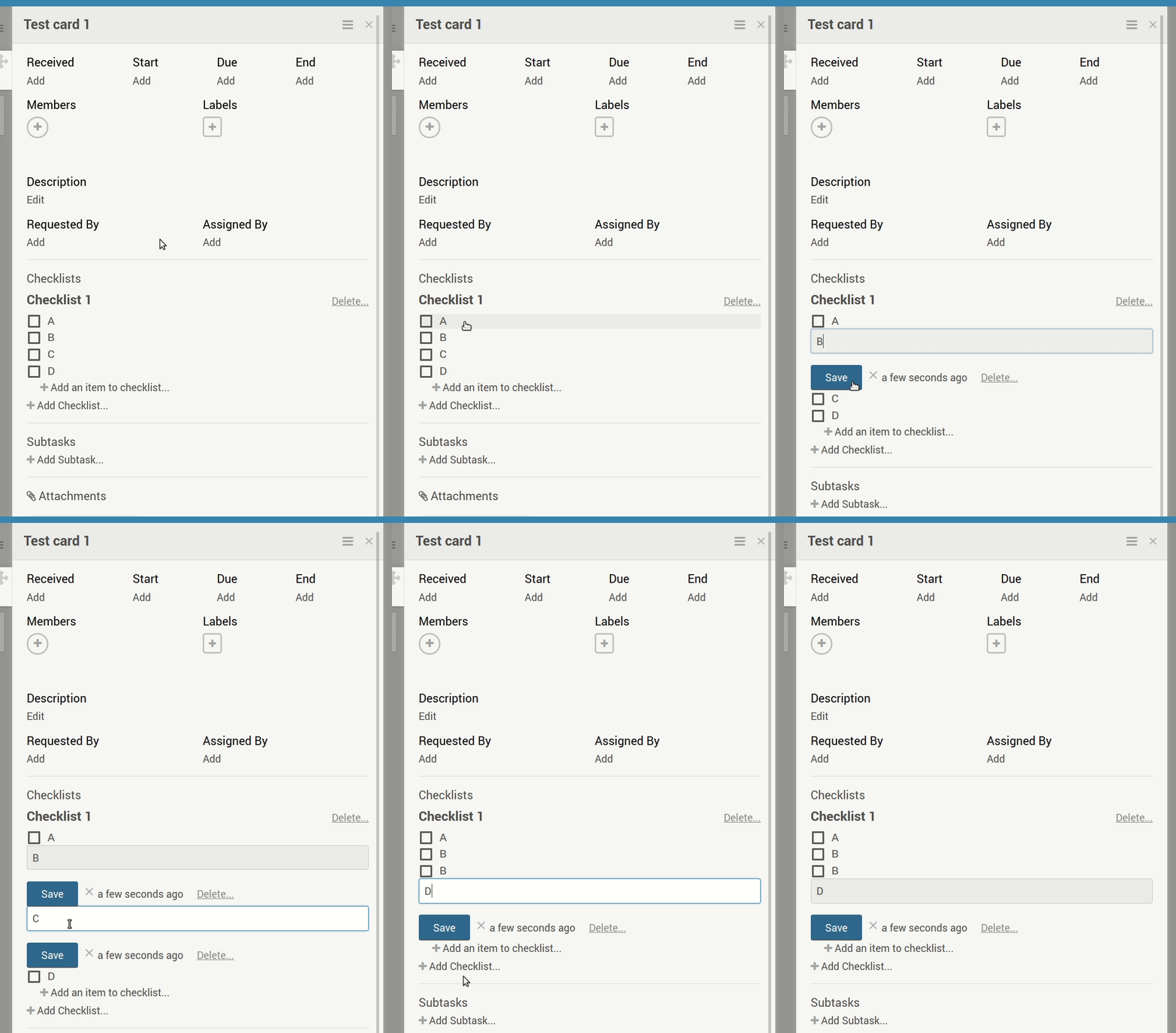
When a checklist item is in edit mode (through the specific steps below), selecting another item for editing does not take the previous item out of edit mode, and upon selecting a third item (or pressing enter) causes the second item to be overwritten by whatever content is in the first selected item.
Server Setup Information:
- Wekan version: 2.74
- Operating System: Ubuntu 16.04
- Deployment Method: snap (stable)
- Http frontend if any: Apache 2.4
- ROOT_URL environment variable: https://my-domain.com/kan
Problem description:
Steps to reproduce
- Have a card with a checklist with 4 (or more) items with contents A, B, C, D (and so on):
- Select item A with LBM
- Select item B with LBM
- Select item C with LBM
- Select item D with LBM
What happens
At step 4, when C opens for editing, B remains in edit mode. At step 5, contents of C are overwritten by contents of B (that is, ”C” becomes a ”B”).
What I expect to happen
At step 4, for B to leave edit mode, and at step 5, the contents of C to remain as they are.
Other notes
- Reproducible in both Chrome and Firefox.
- Curiously, this does not seem to affect the firstly selected item: in step 3 above, A leaves edit mode correctly and thus B doesn’t get overwritten by the contents of item A in step 4.
- At step 5, instead of selecting item D, pressing enter has the same effect.
Browser console output
empty
snap logs wekan.wekan
nothing related
Looks like this is exacerbated by Wekan issue #1911, as it turns out 99,8 % of the log is about the socket connection (since 2018-09-15):
root@battra:~# grep -c -v "received client metadata from anonymous unix socket" /var/snap/wekan/common/mongodb.log
23426
root@battra:~# grep -c "received client metadata from anonymous unix socket" /var/snap/wekan/common/mongodb.log
10970660
Log rotation would still be nice, but nowhere near as critical if less than one percent of the current logging was produced (a few megabytes per year in my setup here, if I extrapolated correctly).
I noticed my mongodb.log has grown pretty large:
root@battra:~# ls -lh /var/snap/wekan/common/mongodb.log
-rw-r--r-- 1 root root 3,1G touko  4 21:14 /var/snap/wekan/common/mongodb.log
The first lines in the log are timestamped 2018-03-02T16:39:44.754+0200.
Should the log rotate automatically, but doesn’t for some reason? Alternatively, should I truncate it manually (and if so, how)? I have no use for the logs apart from the occasional bug reports here, so even losing all of it is fine.
There are no related mongodb settings keys AFAICS. (And sorry if this is unrelated to snap packaging, it was just a guess on my part.)
Server Setup Information:
- Wekan version: 2.65
- Operating System: Ubuntu 16.04
- Deployment Method: snap
- Http frontend if any: Apache 2.4
As a workaround, copying the icons and manifest from public to domain root seems to work (with Wekan snap running behind Apache here). As the files have a wekan- prefix, collisions shouldn’t be an issue. Naturally, this solution does require write access to the domain root directory.
Nope, Chrome manifests this too:
Server Setup Information:
- Did you test in newest Wekan?: yes (current edge is 1.88, the same as stable)
- For new Wekan install, did you configure root-url correctly? yes
- Wekan version: 1.88
- Operating System:
- Deployment Method: snap
- Http frontend: –
- ROOT_URL environment variable: http://localhost
Problem description:
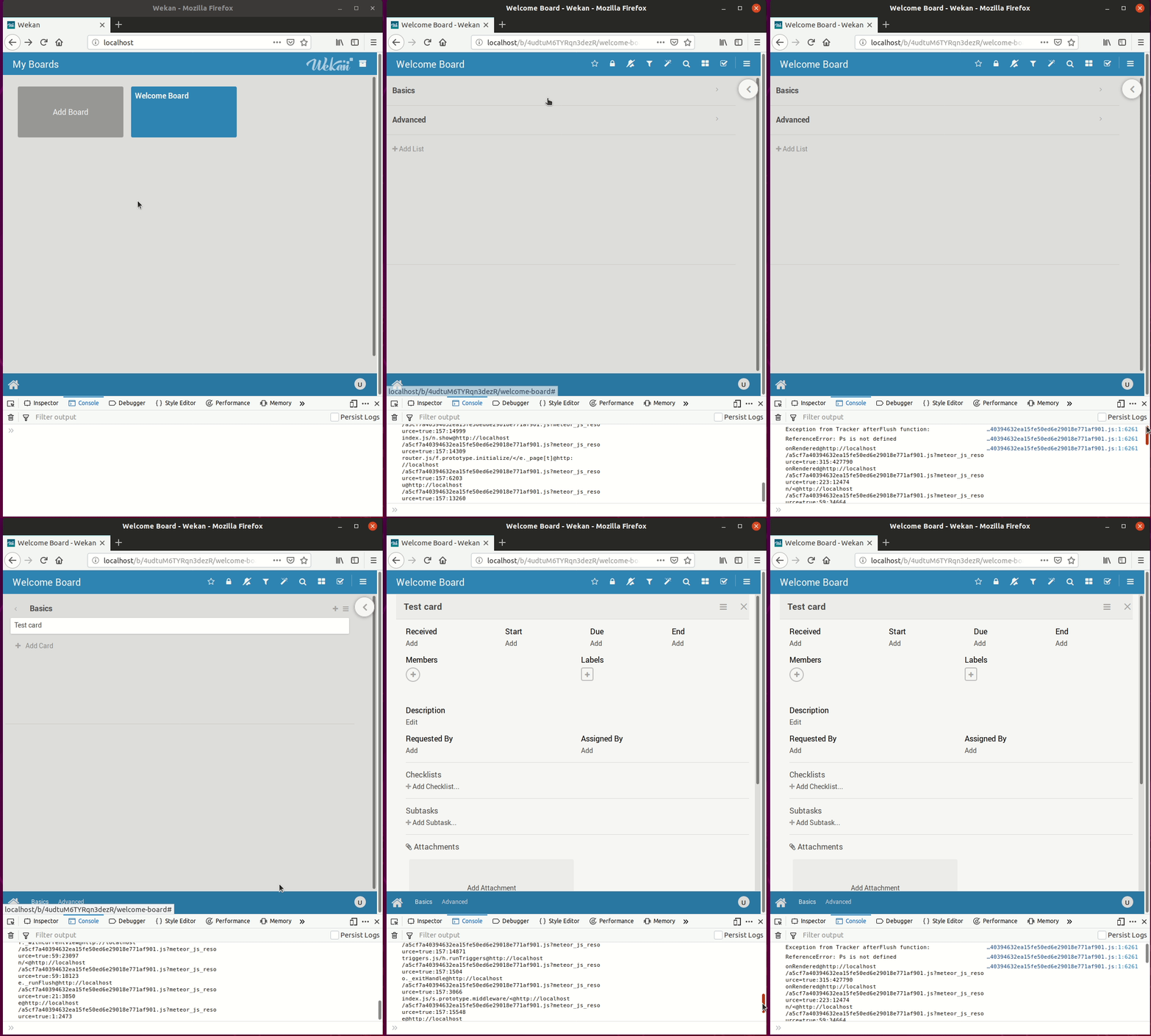
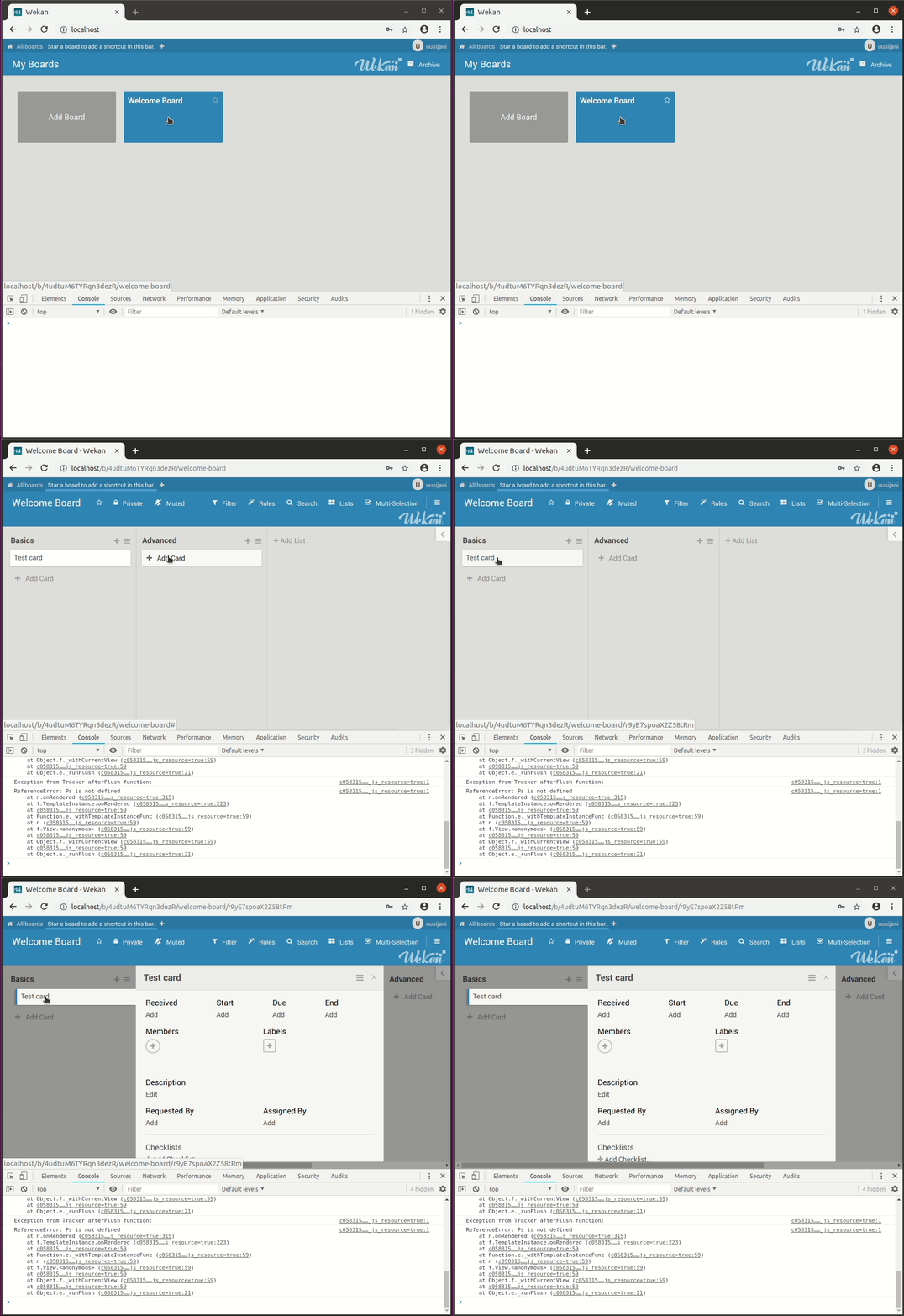
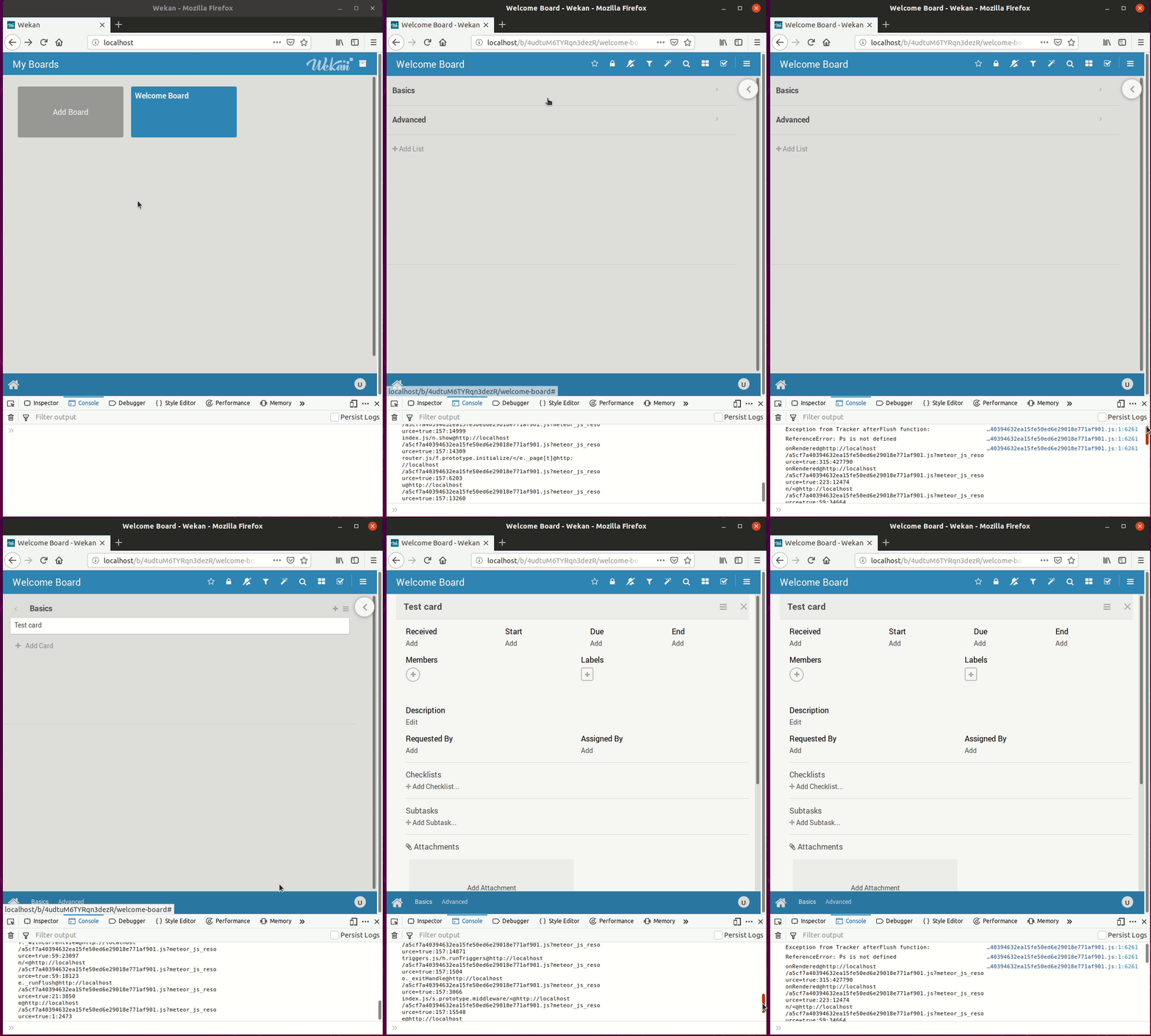
Since (at least) a few days back, my web console (in both Firefox and Chrome) is logging this error whenever I open a card. The same error is also logged for opening a board. Additionally, in the more compact view (when the browser window is small, as in the gif I’m attaching), expanding a list causes the same error, as does closing a card.
This doesn’t seem to affect any functionality AFAICT (although I did notice this while investigating why vertical scrolling within a card is suddenly very slow, but that is probably unrelated and possibly local).
The attached animation is from a fresh install with just the user account and one test card created.
Steps to reproduce:
- Open web console
- Open a card
What happens:
”Exception from Tracker afterFlush function”, ”ReferenceError: Ps is not defined”. Web console log attached.
If using Snap, output from sudo snap logs wekan.wekan
(Nothing during the error event)
Peek animation:
Server Setup Information:
- Wekan version: 1.53
- Deployment Method: snap (tracking stable)
- Operating System: Ubuntu 16.04
- Http frontend: Apache 2.4
- ROOT_URL environment variable https://my-domain.com/kan
Screen recording:

Steps to reproduce:
- Create a card
- Click on the comment field, enter ”some text”
- Click on the description field
- Close the card
- Open the card
- Try to delete the ”some text” comment draft, either by selecting and clearing out the text, or by posting the comment (by selecting ’Comment’)
- Close the card, open it again
What happens:
The comment draft remains in the comment field. If you posted it at step 6 above, you now have the posted comment plus the same comment as draft.
What I expect to happen:
For the comment draft to have been deleted. If you skip step 3 (i.e. don’t click on the description field but close the card directly), the draft is deleted. While I’d actually prefer the draft to remain in this situation, this is slightly better than the undeleteable draft.
Web Console contents:
Upon closing the card at step 4, console shows this:
remove failed: Internal server error 9f30bda751070caba2631cd997a9c88102b36537.js:1:6261
insert failed: i@https://my-domain.com/kan/9f30bda751070caba2631cd997a9c88102b36537.js?meteor_js_resource=true:89:2640
t@https://my-domain.com/kan/9f30bda751070caba2631cd997a9c88102b36537.js?meteor_js_resource=true:89:2478
c.Collection.prototype[i]@https://my-domain.com/kan/9f30bda751070caba2631cd997a9c88102b36537.js?meteor_js_resource=true:89:6720
@https://my-domain.com/kan/9f30bda751070caba2631cd997a9c88102b36537.js?meteor_js_resource=true:111:4415
n/</i[n]@https://my-domain.com/kan/9f30bda751070caba2631cd997a9c88102b36537.js?meteor_js_resource=true:111:1717
set@https://my-domain.com/kan/9f30bda751070caba2631cd997a9c88102b36537.js?meteor_js_resource=true:299:385103
t@https://my-domain.com/kan/9f30bda751070caba2631cd997a9c88102b36537.js?meteor_js_resource=true:299:165991
inlinedform.js/<@https://my-domain.com/kan/9f30bda751070caba2631cd997a9c88102b36537.js?meteor_js_resource=true:299:375381
9f30bda751070caba2631cd997a9c88102b36537.js:1:6261
Other info
- I’d rate this Severity:Inconvenient
- There is at least one way to delete the draft: after clearing out the text, click the description field, then close the card. This again results in the above errors being reported in the console, but opening the card reveals that the draft is now gone.
- This is slightly reminiscient of issue #1287 (also reported by me way back when), though my guess would be that these are completely unrelated, and I’m only making the link here just in case the solutions happen to be similar (as both deal with drafts and saving).
- I’m attaching
snap logs output from today (while testing this), although the events there do not seem to coincide with the draft problem (just card deletion).
@kubiko That’s good to hear, gives me confidence in running the snap on my main server again (instead of the VM). Thanks again guys!