Frankie Knuckles: The Whistle Song. Tästä klassikosta tulee keväinen fiilis vuodenajasta riippumatta, joten tämä sopiikin erityisen hyvin soitettavaksi näin keväällä.
Affected version
I’m using Ubuntu 20.04 and Wayland, with gnome-shell currently at version 3.36.1-4ubuntu1. (I originally filed this on Launchpad.)
Bug summary
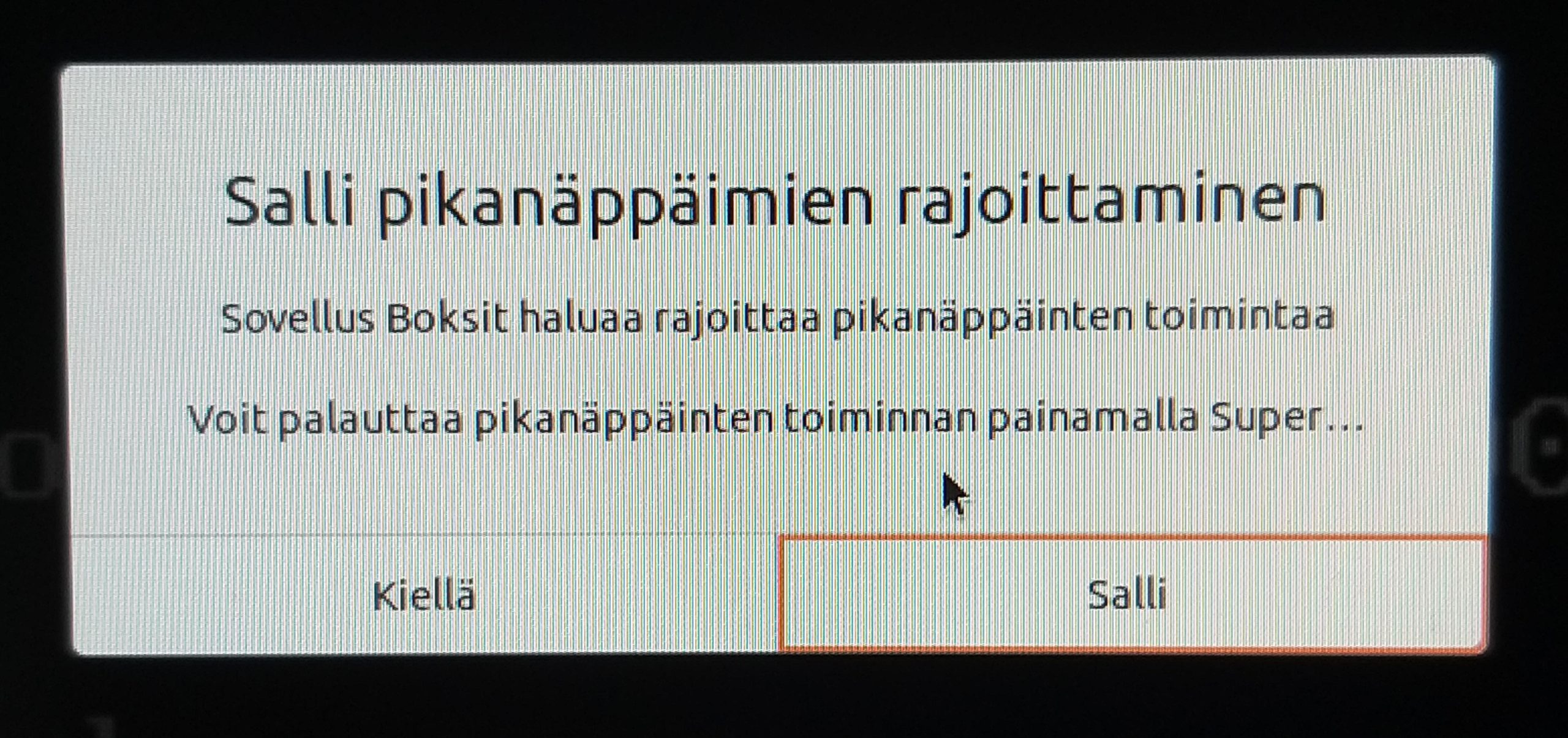
When trying to start a virtual machine with Gnome Boxes, I get a prompt about keyboard shortcuts. The prompt text is localized, but translated back to English it says:
Boxes wants to inhibit shortcuts

You can restore shortcuts by pressing Super+Escape.
In my locale (Finnish), it says
Sovellus Boksit haluaa rajoittaa pikanäppäinten toimintaa.

Voit palauttaa pikanäppäinten toiminnan painamalla Super...
(sic; see attached photo)
So the actual key combination is truncated, defeating the point of that part of the text.
This isn’t a localization error (AFAICT, based on the translation source). Rather, it’s caused by the text being forced to fit on a single line of an arbitrarily fixed width, instead of wrapping to span as many lines as needed.
Screenshot
When trying without root:
$ dd if=/dev/zero bs=16M count=1 of=test.img
1+0 records in
1+0 records out
16777216 bytes (17 MB, 16 MiB) copied, 0.0326881 s, 513 MB/s
$ echo foo | cryptsetup luksFormat test.img –
Not compatible PBKDF options.
Whereas for root it still works:
# dd if=/dev/zero bs=16M count=1 of=test.img
Please touch the device.
1+0 records in
1+0 records out
16777216 bytes (17 MB, 16 MiB) copied, 0.0183403 s, 915 MB/s
# echo foo | sudo cryptsetup luksFormat test.img –
#
For a workaround (from upstream report) with non-root, specify –type luks1:
$ dd if=/dev/zero bs=16M count=1 of=test.img
1+0 records in
1+0 records out
16777216 bytes (17 MB, 16 MiB) copied, 0.0138972 s, 1.2 GB/s
$ echo foo | cryptsetup luksFormat –type luks1 test.img –
$
Oh and I’m using Wayland, in case it matters here. Haven’t yet tried whether Xorg is similarly affected.
When trying to start a virtual machine with Gnome Boxes, I get a prompt about keyboard shortcuts. The prompt text is localized, but translated back to English (I think, based on [1]) it says:
Boxes wants to inhibit shortcuts
You can restore shortcuts by pressing Super+Escape.
In my locale (Finnish), it says
Sovellus Boksit haluaa rajoittaa pikanäppäinten toimintaa.
Voit palauttaa pikanäppäinten toiminnan painamalla Super…
(sic; see attached photo)
So the actual key combination is truncated, defeating the point of that part of the text.
This isn’t a localization error (AFAICT; see [2]). It’s caused by the text being forced to fit on a single line of an arbitrarily fixed width, instead of wrapping to span as many lines as needed.
(I’m reporting this against gnome-shell as opposed gnome-boxes based on [3]. Feel free to reassign as necessary.)
* [1] https://bugs.debian.org/cgi-bin/bugreport.cgi?bug=874526#28
* [2] https://translations.launchpad.net/ubuntu/focal/+source/gnome-shell/+pots/gnome-shell/fi/+translate?batch=10&show=all&search=pikan%C3%A4pp%C3%A4inten
* [3] https://bugzilla.redhat.com/show_bug.cgi?id=1668036
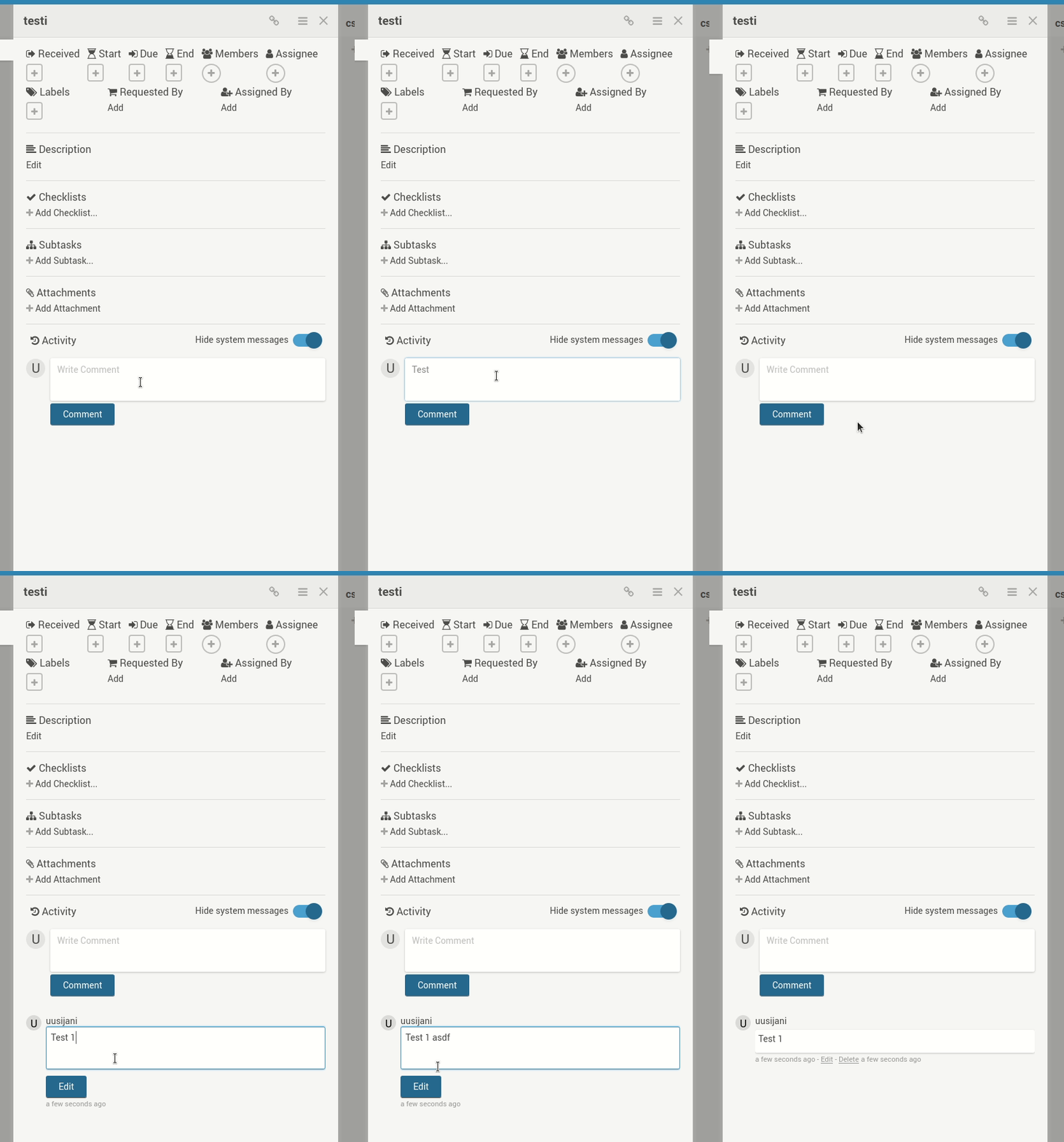
Comments can no longer be updated, as pressing the Edit button just reverts the comment back to what it was prior to editing. Both rich and non-rich editor are affected.
Server Setup Information:
- Wekan version: 3.89
- Operating System: Ubuntu 16.04
- Deployment Method: snap
- Http frontend if any: Apache
- Web browser: both Chrome and Firefox affected
Steps to reproduce
- Add a comment to a card.
- Click the
edit link to start editing the comment, make some changes.
- Click the
Edit button.
What I expect to happen
For the comment to reflect the changes made when editing.
What happens instead
The comment content reverts back to what it was prior to editing.
Logs
Nothing in browser console log, nothing related in server log.
For some of the depressing history of this, see bug #875002 (which has been incorrectly marked as fixed by someone without a clue) from way back in 2011.
I’m using 20.04 and a Wayland session. My preferred focus mode is to have it follow the mouse cursor:
$ gsettings get org.gnome.desktop.wm.preferences focus-mode
’mouse’
Unfortunately this causes GTK apps’ popup (RMB) menu to jump to the app window corner when opened. I’m attaching a screencast, where I demonstrate the bug first, then reset focus-mode to ’click’ to demonstrate the bug no longer manifesting. (Please excuse the flashing. It’s just a video artefact caused by Gnome’s built in screen recorder, which was the only one that at least somewhat worked.)
This has been reported upstream, where a fix was recently merged: https://gitlab.gnome.org/GNOME/mutter/issues/1103

