Reopening. It didn’t go away after all
Reopening. It didn’t go away after all, looks like the occurrence varies (didn’t see it yesterday), perhaps those Chromium settings just made it more probable.
Reopening. It didn’t go away after all, looks like the occurrence varies (didn’t see it yesterday), perhaps those Chromium settings just made it more probable.
I take that back, it seems to have been caused by Chromium all along (more specifically either #threaded-compositing-mode or #deadline-scheduling), despite those glitches appearing outside of Chromium too. Sot it’s a Chromium bug, but I’m too lazy to debug this further (the issue goes away with those configuration flags set to default) so I’ll just mark this as invalid.
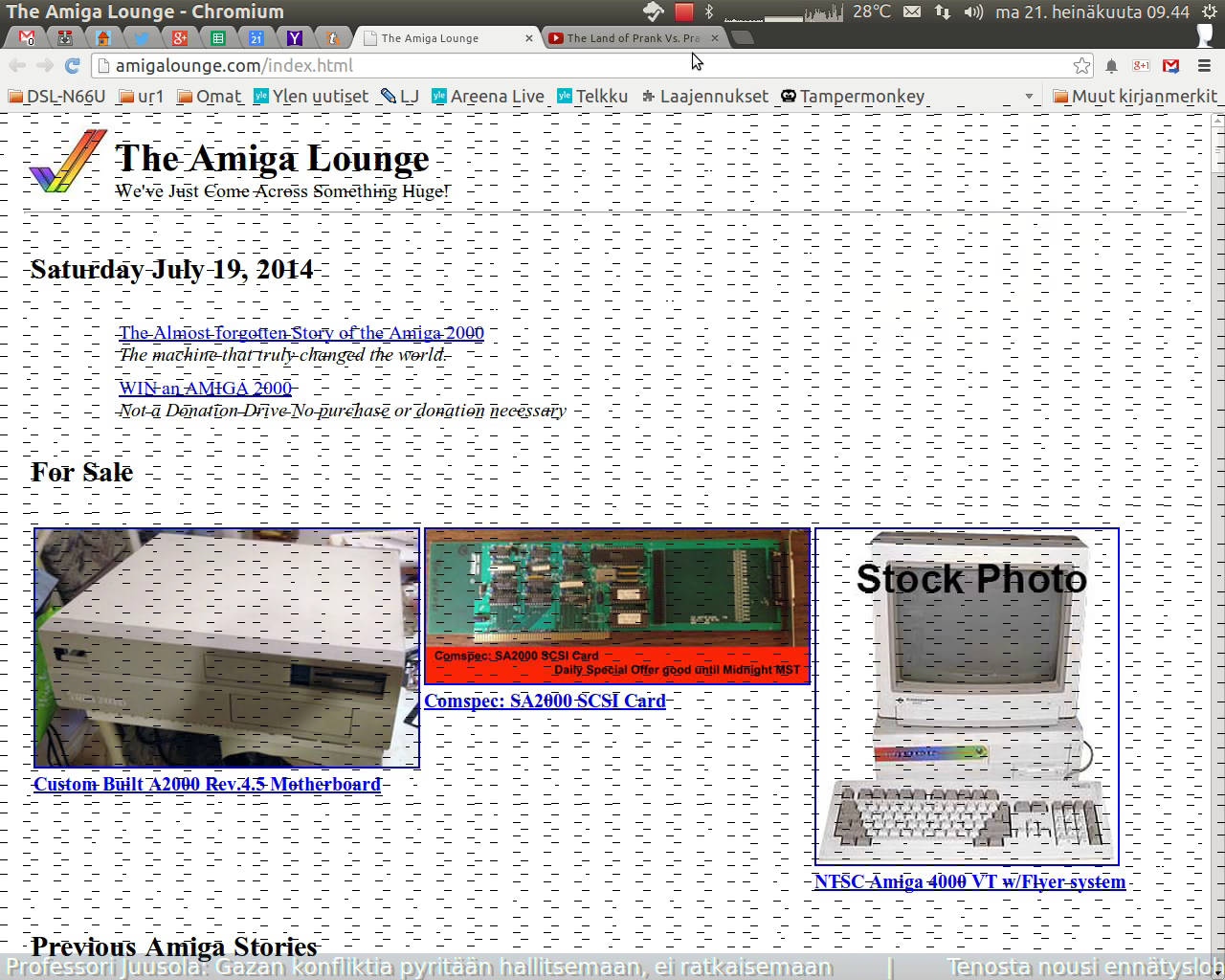
Also, here’s a screenshot (from the video) with the artifacts visible. I notice they seem to cover mostly just Chromium’s content area, but just last night I had this occur just as I was logging out (with the lines remaining on screen until I tried to take a screenshot), with nothing but the log out confirmation running on top of my desktop, so it’s probably not just Chromium that’s causing this.
Ha, finally caught a couple of glimpses of this in a screen recording! Attaching it here.
Since upgrading HWE from -lts-saucy to -lts-trusty, I have had recurring graphical glitches on screen, with short black horizontal lines appearing briefly on screen (on top of normal contents), particularly when switching between applications. The lines appear only for a few 100 ms before going away (just enough to register in your eye that there’s something there), so I’ve been trying to make a screen recording to capture it, but of course the phenomenon goes away when I do (perhaps RecordMyDesktop does something with the screen that makes it less likely to appear).
I have another 12.04 system with desktop Radeon graphics, and there -lts-trusty has not produced this issue so far (the one with the issue and the one I’m attaching the logs here from has Intel).
I don’t recall seeing this with -lts-saucy or other previous Xorg packages. It was so obvious right after upgrading that either it never occurred before or was so rare or quick to flash away that it didn’t register.
Back in the day, I used to use Baruch Even’s WebSec just for this. It seems unmaintained nowadays unfortunately, but might still work.
Näitä ei ihan tuosta vain heitetä korviin kiireessä, mutta kunhan tulpat malttaa puristella sopiviksi, ne istuvat hyvin myös vähän nirsompiin korvakäytäviin, ja pysyvät hyvin paikoillaan. Ulkoinen melu vaimenee kätevästi samalla, joten volyymin kanssa ei tarvitse revitellä turhia.
Omaan kouraani liian siro, mutta parempi puolisko, jolle tämä tilattiinkin, käski sanoa, että naisen s-koon käteen hyvä. Moitteeton perushiiri, ja vieläpä langallinen niin kuin sen olla pittää.
1. Ubuntu
2. Unity
3. Vim, Gedit
4. Gmail (on the web)
5. Chromium
6. Screen, yes