Suosikkijuustoni on Valion 15-prosenttinen Polar (Valsa). Viime kuukaudet se on jostain syystä aina ollut kahtia haljenneena pakkauksesta otettuna. En tiedä onko vika logistiikassa vai tuotantopäässä, mutta teiltä onnistunee tuon syyn selvittäminen. Ostan juustoni useimmiten samasta myymälästä (Oulun Linnanmaan Prisma), eli myöskään käsittelyvirhe siellä ei ole poissuljettu.
Eihän tuo makuun tai syömäkelpoisuuteen vaikuta millään lailla, mutta tuo halkeilu tekee juustosta huonosti höylättävän, varsinkin kun ruukaan höylätä tiiliskiven päästä. Haljenneesta köntistä veistetyt siivut katkeilevat halkeamakohdista pikku pätkiksi.



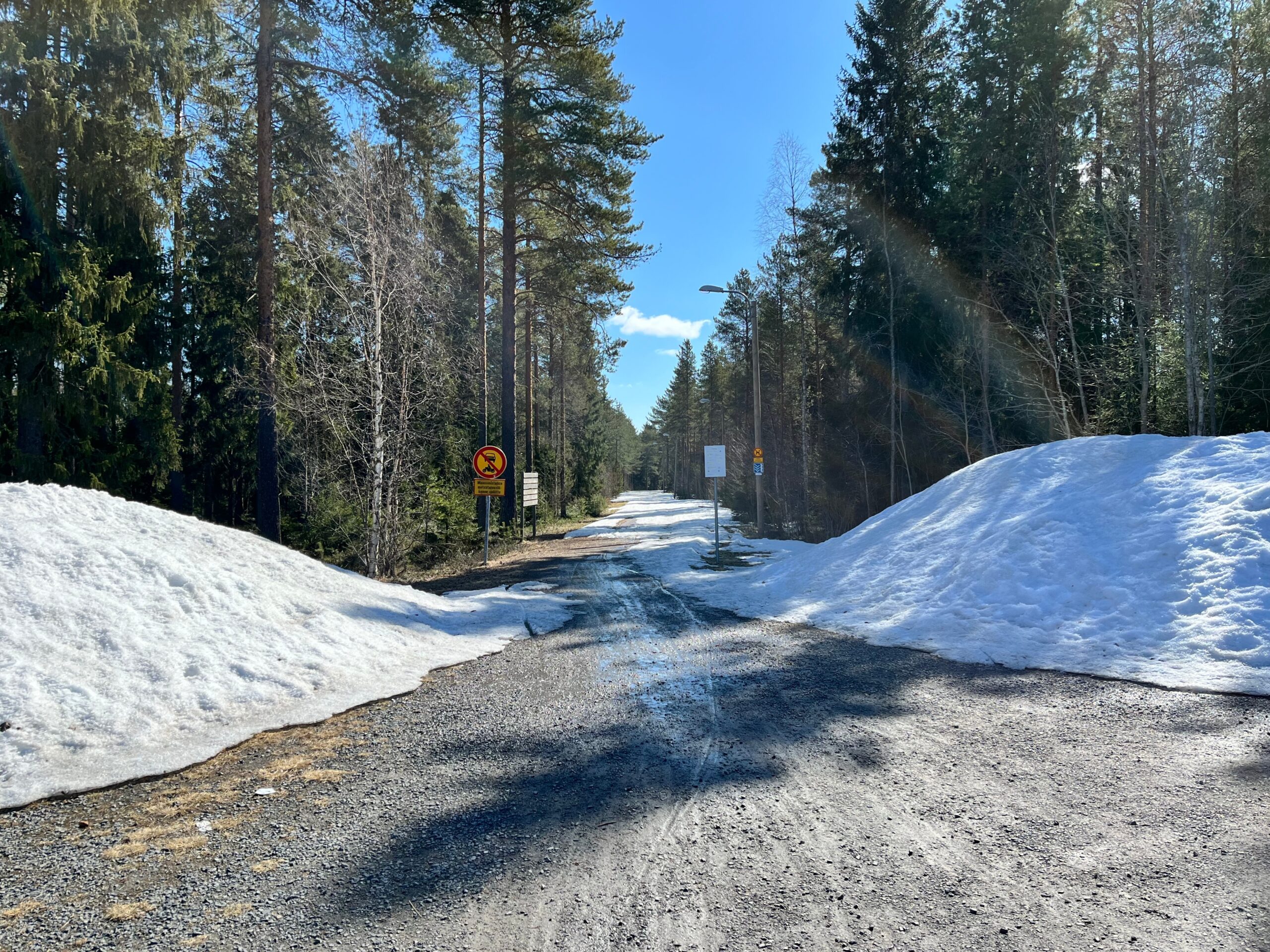
Nämä sateenkaarimaiset juovat (kuvassa oikealla, puiden edustalla) löysin vasta jälkikäteen tästä kuvasta, eli paikan päällä en näitä huomannut; ehkä polarisoivien aurinkolasien takia, jollei sitten kyse ole vain kameran tuottamasta artefaktista. Ajattelin kuitenkin tarjota tunnistettavaksi, kun en keksinyt että mistä ilmiöstä on kyse. Lähinnä tuli mieleen jääsumuhalo, mutta vaikka täällä viime yönä pakkasta olikin, niin kuvaa ottaessani ilman lämpötila oli jo +2…3 °.

Wrt. episode 083: To me, Sky’s yipping in his sleep is on par with the ”coffee” signing chimp as evidence for dreams. Even if it is just a reflex, it’s in reaction to his _interpretation of his situation_ which, based on his behavior while awake, is ”I’m frustrated by not being able to keep up”. I’m sure he’s having that dream we’ve all had, where you’re trying to run, but your legs just feel like lumps of lead (which is probably your brain trying to make sense of not getting feedback from your sleep-paralysed muscles, despite bombarding them with ”RUN!” signals).
On another note, I found it hilarious how, back in episode 082, you were trying to channel future Bec, future Bec transmitted stomach rumbling noises, and then the food poisoning episode happened. You should have listened to future Bec!
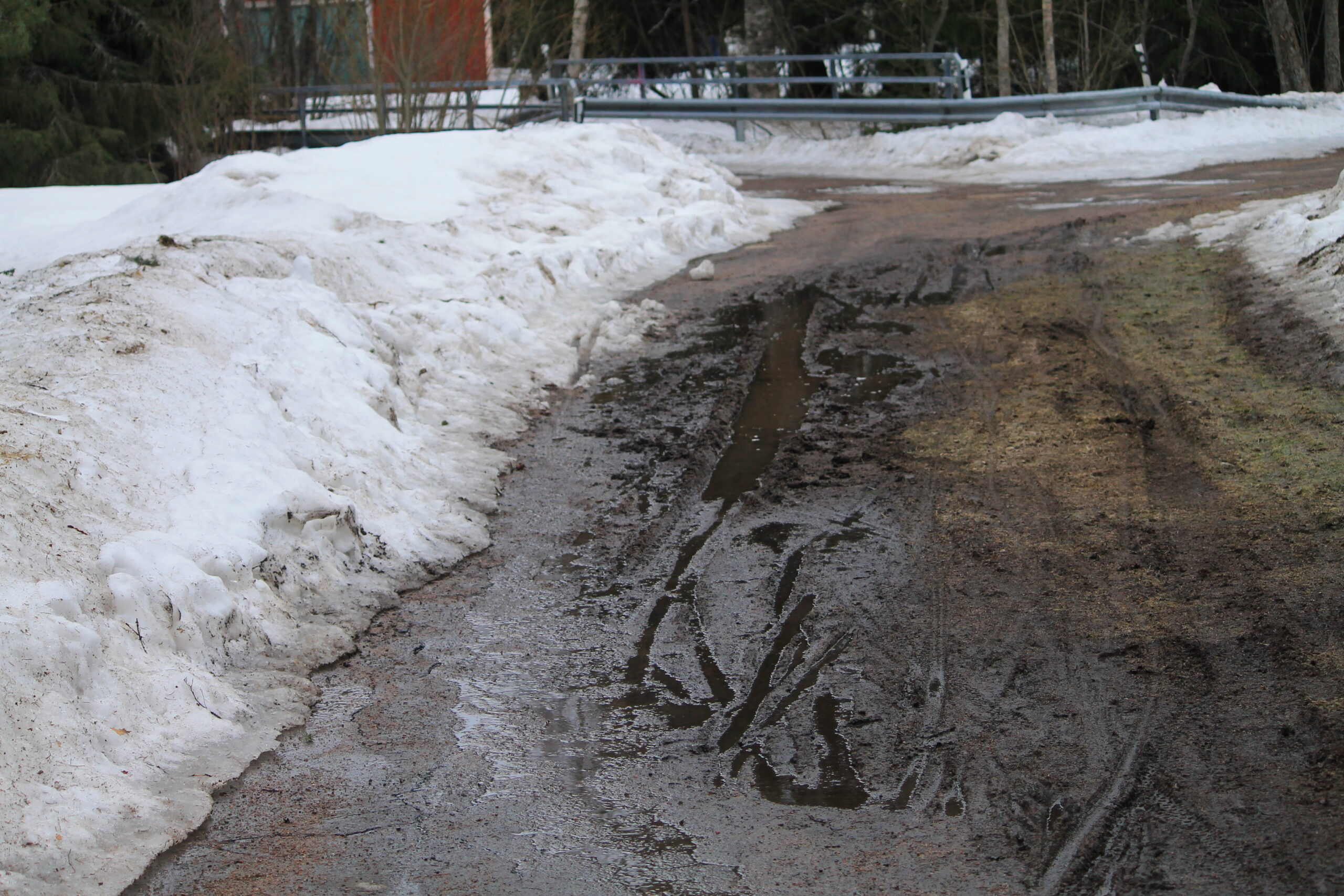
Auraus oikaissut asvaltin mutkan kohdalla pientareen kautta, ja se on nyt sulanut tuollaiseksi mutavelliksi.
As a workaround, adding --no-warnings seems to suppress this output.
Yup, I can also confirm that v1.67.0-beta.7775.8cb7f28f8.fix-7673-dir-wrapping fixes this!
Ah, apparently ”Show content warnings” on the app is the opposite of what’s ”Always expand posts marked with content warnings” in the web UI. I was confused because the former refers to the warning, whereas the latter refers to the content. There may be minor usability issue there, but I’ll leave it out of this one.
Sorry for the noise. To make up for it, #290 looks like a duplicate of this one and thus could possibly also be closed.
I have ”Always expand posts marked with content warnings” on in my settings, but CW-marked posts in the Android app still show as unexpanded.
I’m fairly sure this used to work until recently, and #87 being closed as ”completed” back in October would imply I wasn’t just imagining it.
What is the problem you are having with rclone?
I’m using a crypt-on-sftp remote, which was working just fine up until v1.65.2. With v1.66, attempts to sync to it now fail with ”optional feature not implemented”. I’ve not narrowed down whether it’s the crypt or the sftp layer, so I’m just reporting my (failing) test case below.
I did a bisect, and apparently this issue came in at f5f8678 (which was a fix for #6685).
What is your rclone version (output from rclone version)
1.66.0
Which OS you are using and how many bits (e.g. Windows 7, 64 bit)
Ubuntu 22.04 (64-bit)
Which cloud storage system are you using? (e.g. Google Drive)
sftp
The command you were trying to run (e.g. rclone copy /tmp remote:tmp)
rclone sync a/ C:
Steps to reproduce
rclone --config test.conf config- set up sftp (44) remote called S
- for test purposes here I’m using localhost as the underlying remote server
- set user & password
- leave everything else at defaults
- set up crypt remote C, with
- ”S:ftp” as the underlying remote
- Very simple filename obfuscation (obfuscate)
- Encrypt directory names (true)
- set password, no password2
mkdir -p ftp a/b # on the sftp remote; here I'm using localhosttouch a/test1 # on the sftp remoterclone --config test.conf sync a/ C: -vv # no problemstouch a/b/test2 # on the sftp remoterclone --config test.conf sync a/ C: -vv
A log from the command with the -vv flag (e.g. output from rclone -vv copy /tmp remote:tmp)
2024/03/12 14:33:36 DEBUG : rclone: Version "v1.66.0" starting with parameters ["rclone" "--config" "test.conf" "sync" "a/" "C:" "-vv"]
2024/03/12 14:33:36 DEBUG : Creating backend with remote "a/"
2024/03/12 14:33:36 DEBUG : Using config file from "/home/jani/test.conf"
2024/03/12 14:33:36 DEBUG : fs cache: renaming cache item "a/" to be canonical "/home/jani/a"
2024/03/12 14:33:36 DEBUG : Creating backend with remote "C:"
2024/03/12 14:33:37 DEBUG : Creating backend with remote "S:ftp"
2024/03/12 14:33:37 DEBUG : sftp://jani@localhost:22/ftp: New connection 127.0.0.1:48814->127.0.0.1:22 to "SSH-2.0-OpenSSH_8.9p1 Ubuntu-3ubuntu0.6"
2024/03/12 14:33:37 DEBUG : sftp://jani@localhost:22/ftp: Shell type "unix" from config
2024/03/12 14:33:37 DEBUG : sftp://jani@localhost:22/ftp: Relative path resolved to "/home/jani/ftp"
2024/03/12 14:33:37 DEBUG : sftp://jani@localhost:22/ftp: Using root directory "/home/jani/ftp"
2024/03/12 14:33:37 DEBUG : test1: Size and modification time the same (differ by -995.288851ms, within tolerance 1s)
2024/03/12 14:33:37 DEBUG : test1: Unchanged skipping
2024/03/12 14:33:37 DEBUG : b/test2: Need to transfer - File not found at Destination
2024/03/12 14:33:37 DEBUG : Encrypted drive 'C:': Waiting for checks to finish
2024/03/12 14:33:37 DEBUG : Encrypted drive 'C:': Waiting for transfers to finish
2024/03/12 14:33:37 DEBUG : sftp://jani@localhost:22/ftp: Shell path "/home/jani/ftp/98.g/149.zkyz4.EACoEuq1.vgxzogr"
2024/03/12 14:33:37 DEBUG : sftp://jani@localhost:22/ftp: Running remote command: md5sum /home/jani/ftp/98.g/149.zkyz4.EACoEuq1.vgxzogr
2024/03/12 14:33:37 DEBUG : sftp://jani@localhost:22/ftp: Remote command result: ac83867dee807f03ee4f8f307cda1257  /home/jani/ftp/98.g/149.zkyz4.EACoEuq1.vgxzogr
2024/03/12 14:33:37 DEBUG : 98.g/149.zkyz4.EACoEuq1.vgxzogr: Parsed hash: ac83867dee807f03ee4f8f307cda1257
2024/03/12 14:33:37 DEBUG : b/test2.yuwiyok9.partial: md5 = ac83867dee807f03ee4f8f307cda1257 OK
2024/03/12 14:33:37 DEBUG : b/test2.yuwiyok9.partial: renamed to: b/test2
2024/03/12 14:33:37 INFO  : b/test2: Copied (new)
2024/03/12 14:33:37 ERROR : Encrypted drive 'C:': not deleting files as there were IO errors
2024/03/12 14:33:37 ERROR : Encrypted drive 'C:': not deleting directories as there were IO errors
2024/03/12 14:33:37 ERROR : Attempt 1/3 failed with 1 errors and: optional feature not implemented
2024/03/12 14:33:37 DEBUG : test1: Size and modification time the same (differ by -995.288851ms, within tolerance 1s)
2024/03/12 14:33:37 DEBUG : test1: Unchanged skipping
2024/03/12 14:33:37 DEBUG : b/test2: Size and modification time the same (differ by -116.891668ms, within tolerance 1s)
2024/03/12 14:33:37 DEBUG : b/test2: Unchanged skipping
2024/03/12 14:33:37 DEBUG : Encrypted drive 'C:': Waiting for checks to finish
2024/03/12 14:33:37 DEBUG : Encrypted drive 'C:': Waiting for transfers to finish
2024/03/12 14:33:37 ERROR : Encrypted drive 'C:': not deleting files as there were IO errors
2024/03/12 14:33:37 ERROR : Encrypted drive 'C:': not deleting directories as there were IO errors
2024/03/12 14:33:37 ERROR : Attempt 2/3 failed with 1 errors and: optional feature not implemented
2024/03/12 14:33:37 DEBUG : test1: Size and modification time the same (differ by -995.288851ms, within tolerance 1s)
2024/03/12 14:33:37 DEBUG : test1: Unchanged skipping
2024/03/12 14:33:37 DEBUG : b/test2: Size and modification time the same (differ by -116.891668ms, within tolerance 1s)
2024/03/12 14:33:37 DEBUG : b/test2: Unchanged skipping
2024/03/12 14:33:37 DEBUG : Encrypted drive 'C:': Waiting for checks to finish
2024/03/12 14:33:37 DEBUG : Encrypted drive 'C:': Waiting for transfers to finish
2024/03/12 14:33:37 ERROR : Encrypted drive 'C:': not deleting files as there were IO errors
2024/03/12 14:33:37 ERROR : Encrypted drive 'C:': not deleting directories as there were IO errors
2024/03/12 14:33:37 ERROR : Attempt 3/3 failed with 1 errors and: optional feature not implemented
2024/03/12 14:33:37 INFO  :
Transferred:   	         32 B / 32 B, 100%, 0 B/s, ETA -
Errors:                 1 (retrying may help)
Checks:                 5 / 5, 100%
Transferred:            1 / 1, 100%
Elapsed time:         0.3s

2024/03/12 14:33:37 DEBUG : 15 go routines active
2024/03/12 14:33:37 DEBUG : sftp://jani@localhost:22/ftp: Closing 1 unused connections
2024/03/12 14:33:37 Failed to sync: optional feature not implemented
How to use GitHub
- Please use the 👍 reaction to show that you are affected by the same issue.
- Please don’t comment if you have no relevant information to add. It’s just extra noise for everyone subscribed to this issue.
- Subscribe to receive notifications on status change and new comments.
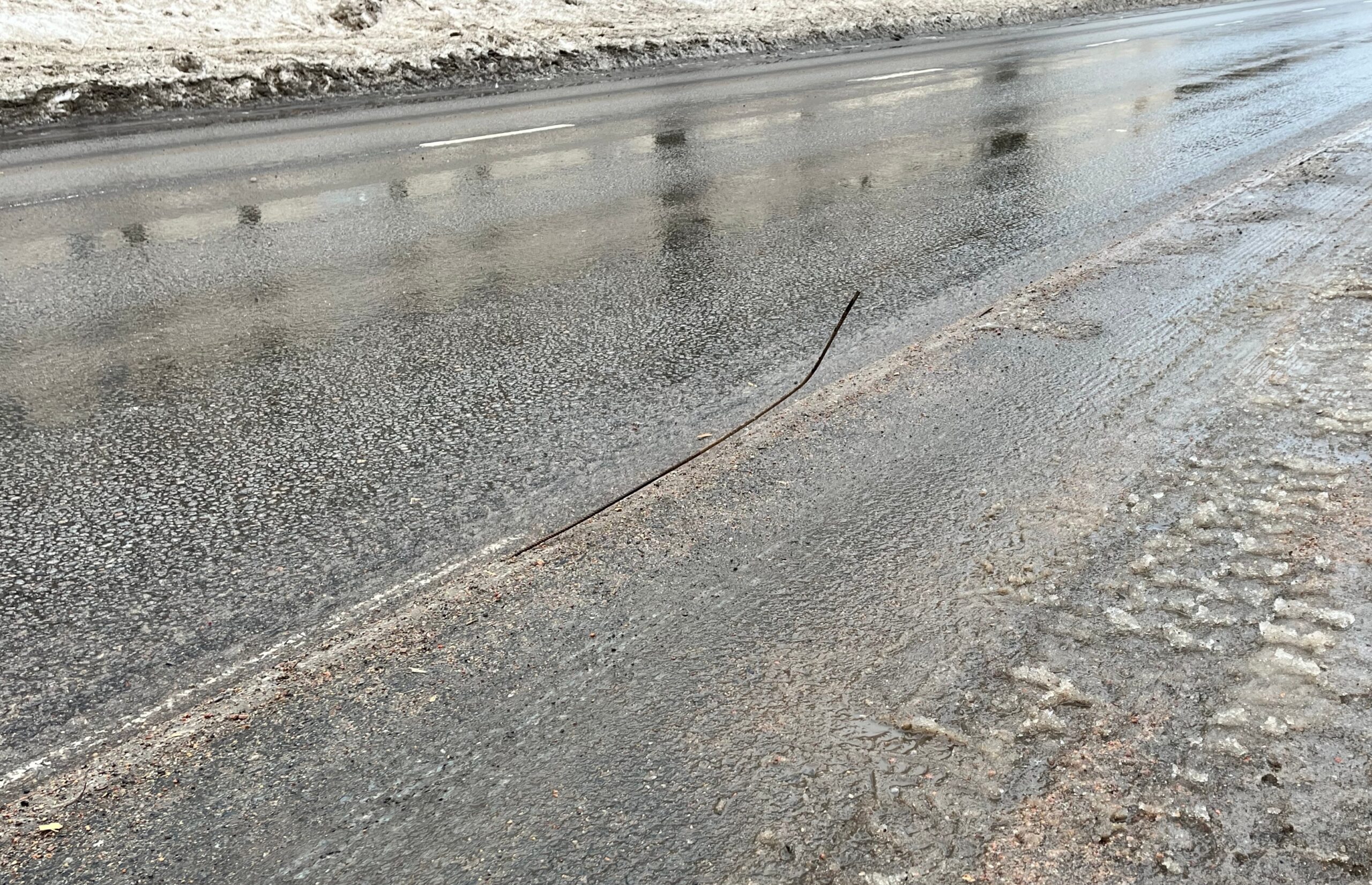
Raudoitusrauta törröttää pyörätien laidalla.