Checksum mismatch in deb package for .desktop files
- VSCode Version: 1.53.0
- OS Version: Ubuntu Linux 20.04
Steps to Reproduce:
- install .deb package
- run
debsums -s
Does this issue occur when all extensions are disabled?: Yes
I’d like to resurrect #37762: the checksums for .desktop files included in the .deb archive fail to pass post-install.
$ debsums -s code
debsums: changed file /usr/share/applications/code.desktop (from code package)
debsums: changed file /usr/share/applications/code-url-handler.desktop (from code package)
This happens because the postinst script calls desktop-file-install for the .desktop files, which adds an X-Desktop-File-Install-Version entry to them, and hence the checksums change.
I don’t know why the desktop-file-install call is there, as including the .desktop files in the deb archive is sufficient to have them installed (in their proper place under /usr/share/applications/), with the checksum intact.
I built the package with just those desktop-file-install calls removed (see below), after which the checksums pass post-install (with no other changes that I can see).
diff --git a/resources/linux/debian/postinst.template b/resources/linux/debian/postinst.template
index c72fe5f9f5..dcc147de93 100755
--- a/resources/linux/debian/postinst.template
+++ b/resources/linux/debian/postinst.template
@@ -12,12 +12,6 @@ ln -s /usr/share/@@NAME@@/bin/@@NAME@@ /usr/bin/@@NAME@@
 # developers would prefer a terminal editor as the default.
 update-alternatives --install /usr/bin/editor editor /usr/bin/@@NAME@@ 0

-# Install the desktop entry
-if hash desktop-file-install 2>/dev/null; then
-       desktop-file-install /usr/share/applications/@@NAME@@.desktop
-       desktop-file-install /usr/share/applications/@@NAME@@-url-handler.desktop
-fi
-
 # Update mimetype database to pickup workspace mimetype
 if hash update-mime-database 2>/dev/null; then
update-mime-database /usr/share/mimeAll right, looks like this is VSCode issue #37762 (and MD5 usage is #99760).
All right, looks like this is VSCode issue #37762 (and MD5 usage is #99760).
.desktop files’ checksums mismatch in deb package
$ md5sum --quiet -c /var/lib/dpkg/info/codium.md5sums
usr/share/applications/codium-url-handler.desktop: FAILED
usr/share/applications/codium.desktop: FAILED
md5sum: WARNING: 2 computed checksums did NOT match

$ apt-cache policy codium
codium:
  Installed: 1.51.1-1605141118
  Candidate: 1.51.1-1605141118
  Version table:
 *** 1.51.1-1605141118 500
        500 https://paulcarroty.gitlab.io/vscodium-deb-rpm-repo/debs vscodium/main amd64 Packages
100 /var/lib/dpkg/statusCapable for the price, but inseparably tied to cloud
Given the price (less than 20 € when I bought mine) this is quite a capable little device. Physical manufacturing quality felt pretty good too.
Unfortunately the software is inseparably tied to manufacturer’s cloud service, and bypassing it for direct local access (such as RTSP) does not appear to be possible (not in a way that’s useful anyway). That’s the reason I ended up returning mine.
Sorry, tried to link this with LP #1723881 but failed, because LP #1334
Sorry, tried to link this with LP #1723881 but failed, because LP #1334
I prefer to think that was just epic trolling, cracked me up.
I prefer to think that was just epic trolling, cracked me up.
There’s also LP #1876157: Memtest86+ in Ubuntu 20.04 doesn’t work
While hardware fault and memtest bugs are possible, there’s also LP #1876157: Memtest86+ in Ubuntu 20.04 doesn’t work. So if the memtest you ran was from Ubuntu 20.04 images, try running memtest from Ubuntu 18.04 images.
TASsers have beaten multiple NES Mega Man games using the same input
Some TASsers have beaten (for instance) multiple NES Mega Man games using the same input, see tasvideos 871M. So you could also try the Double Joy with two C64s (or two Ataris) running different titles that are similar enough in mechanics.
Controls remain on screen after switching to fullscreen before video has loaded
Checklist
- I am using the latest version – v0.22.1
- I checked, but didn’t find any duplicates (open OR closed) of this issue in the repo.
- I have read the contribution guidelines
- This issue contains only one bug. I will open one issue for every bug report I want to file.
Steps to reproduce the bug
- Disable ”Start main player in fullscreen” in NewPipe settings
- Have a somewhat slow-to-load video (for whatever reason)
- Open the video in Newpipe
- Before video details (such as duration) have loaded, tap to switch to fullscreen
Actual behaviour
The playback controls remain on screen while the video plays, I have to tap once more to make them go away.
Expected behavior
The playback controls should disappear like they do when switching to fullscreen after the video details have loaded (and playback has begun).
Screenshots/Screen recordings
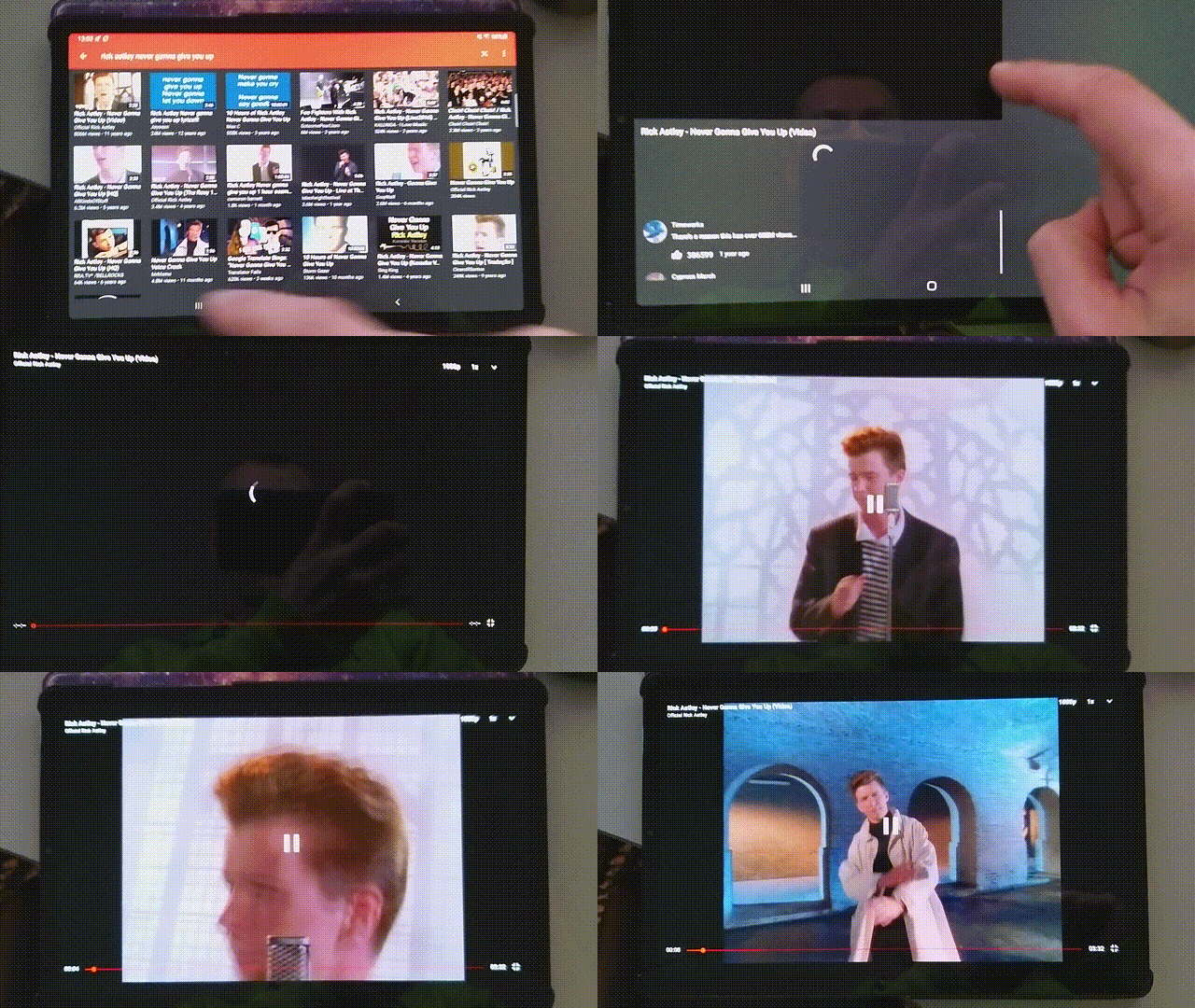
Device info
- Android version/Custom ROM version: Android 10 with OneUI 2.5
- Device model: Samsung Galaxy Tab S5e
I’m affected by this too, in Ubuntu 20.04 with Firefox 83.0+build2-0ubuntu0.20.04.1.
Tested nightly (85.0a1.en-US.linux-x86_64) with a clean profile, and the issue remains.
Steps to reproduce
./firefox -no-remote -profilemanager./firefox -no-remote -profilemanager, select the previously created profileWhat happens
None of the three tabs load any content. The firefox process also doesn’t end after closing this window with the non-working tabs, I have to Ctrl-C out of it.
Further info
Upon subsequent starts, Nightly does appear to correctly load the tabs, whereas for my main Twitter profile and FF 83.0 no amount of restarts seems to help; instead I have to open another tab and open m.twitter.com in it, then click on the home button to have the home tabs load (and close the first, still stuck set of home tabs).